

Overview
The InfisicalAuth CRD defines how the Infisical Operator authenticates with your Infisical instance. It encapsulates the machine identity authentication method and credentials. Once created, it can be referenced by multiple secret resources, so you only need to define authentication details once per identity. The operator caches authenticated credentials using the token’s TTL (at 70% of the expiration time) so that multiple resources sharing the sameInfisicalAuth don’t trigger redundant login calls. The cache is automatically invalidated when the InfisicalAuth spec changes or when the referenced InfisicalConnection is updated.
Prerequisites
- The operator is installed on your Kubernetes cluster.
- A machine identity configured in Infisical with access to the relevant project(s).
- An InfisicalConnection resource created in your cluster.
Example
You can only define one authentication method per InfisicalAuth resource.Kubernetes Auth (Recommended)
Kubernetes Auth (Recommended)
Short-lived service account tokens (Recommended)
Short-lived service account tokens (Recommended)
Create a machine identity
 When creating an identity, you specify an organization level role for it to assume; you can configure roles in Access Control > Roles.
 Now input a few details for your new identity. Here’s some guidance for each field:
- Name (required): A friendly name for the identity.
- Role (required): A role from the Organization Roles tab for the identity to assume. The organization role assigned will determine what organization level resources this identity can have access to.

Add the identity to a project


Create a service account
Bind the reviewer service account
system:auth-delegator cluster role. This allows Infisical to perform delegated authentication checks against the TokenReview API.Create a generic Kubernetes secret containing the machine identity ID
kubernetes-credentials in the default namespace, and add the machine identity ID as the value of the identityId key.Create the InfisicalAuth resource with your service account details
system:auth-delegator cluster role, you are ready to create the InfisicalAuth resource using the kubernetes auth method.Apply the resource
Use Gateway as Reviewer
Use Gateway as Reviewer
system:auth-delegator ClusterRole binding.Deploying a gateway
Configure the Kubernetes Auth authentication method for the identity
Review Method to “Gateway as Reviewer”, and select the gateway you want to use as the token reviewer.You can select either an individual gateway or a Gateway Pool for automatic failover. When a pool is selected, the platform routes through a healthy gateway at request time. See Gateway Pools for more details.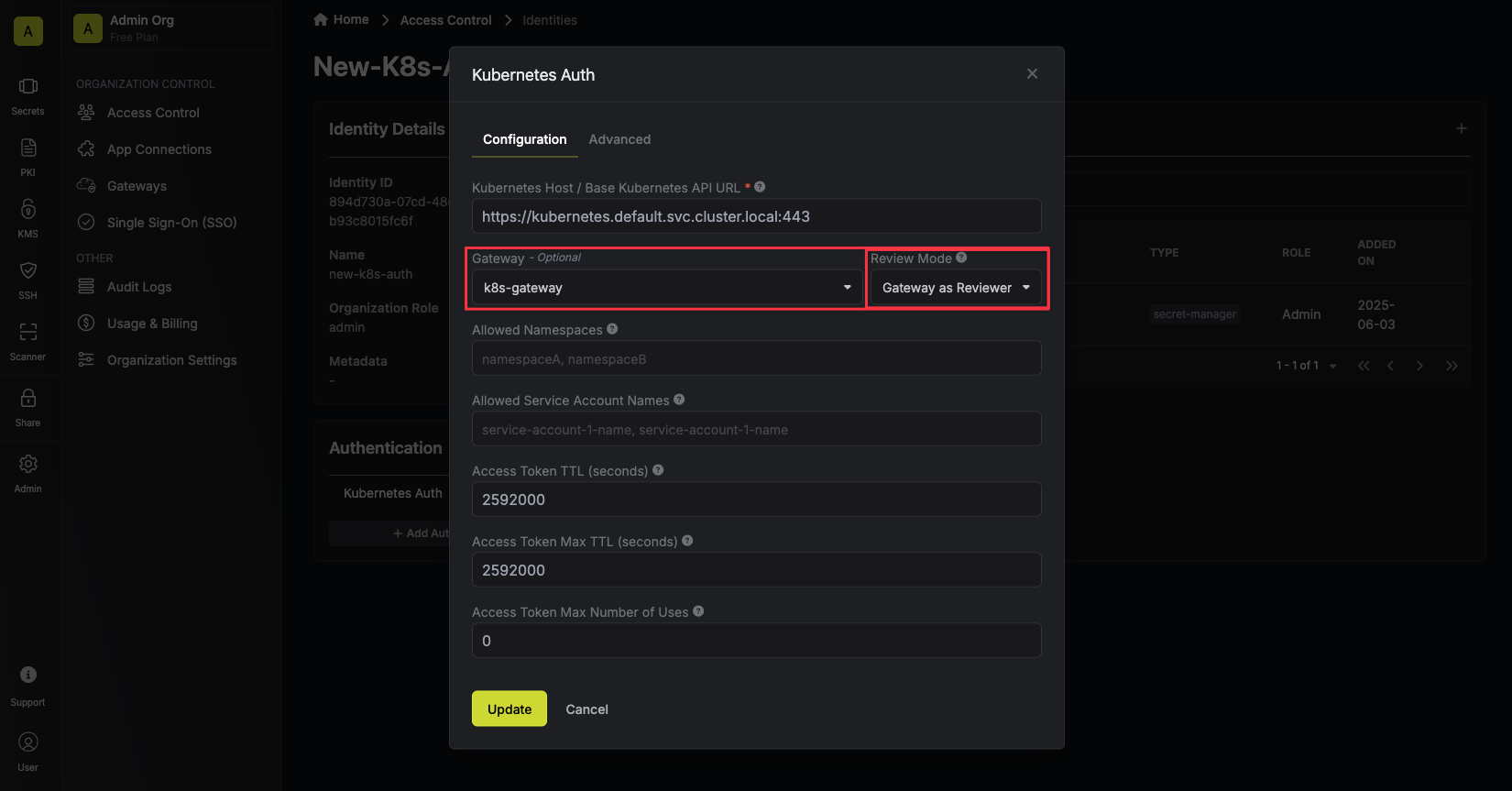
Create a generic Kubernetes secret containing the machine identity ID
kubernetes-credentials in the default namespace, and add the machine identity ID as the value of the identityId key.Create the InfisicalAuth resource
Apply the resource
Universal Auth
Universal Auth
Create a machine identity
Create Kubernetes secret containing machine identity credentials
<your-identity-client-id> with the identity client ID and <your-identity-client-secret> with the identity client secret.Add reference for the Kubernetes secret containing the identity credentials
secretName and secretNamespace of the secret that was just created under universal.clientIdRef and universal.clientSecretRef fields in the InfisicalAuth resource. See the full example below for reference.AWS IAM Auth
AWS IAM Auth
Azure Auth
Azure Auth
GCP ID Token Auth
GCP ID Token Auth
GCP IAM Auth
GCP IAM Auth
LDAP Auth
LDAP Auth
identityId, username, and password keys:Troubleshooting
You can check the status of yourInfisicalAuth resource by inspecting its conditions:
secrets.infisical.com/IsReady condition will have Status: "True" and Reason: "OK".
If authentication is unhealthy, Reason will be set to Error and Message will contain details about what went wrong.
The ObservedGeneration field indicates which generation of the resource spec the operator has last processed. If ObservedGeneration is less than metadata.generation, the operator hasn’t yet reconciled the latest changes to the resource.