Learn how to configure a Azure Key Vault Connection for Infisical.
Infisical supports four methods for connecting to Azure Key Vault: OAuth, Client Secret, Certificate (SPN with certificate), and Managed Identity.
Self-Hosted Instance
Using the Azure Key Vault connection on a self-hosted instance of Infisical requires configuring an application in Azure
and registering your instance with it.Prerequisites:
Set up Azure and have an existing Key Vault instance.
1
Create an application in Azure
Navigate to Entra ID > App registrations to create a new application.
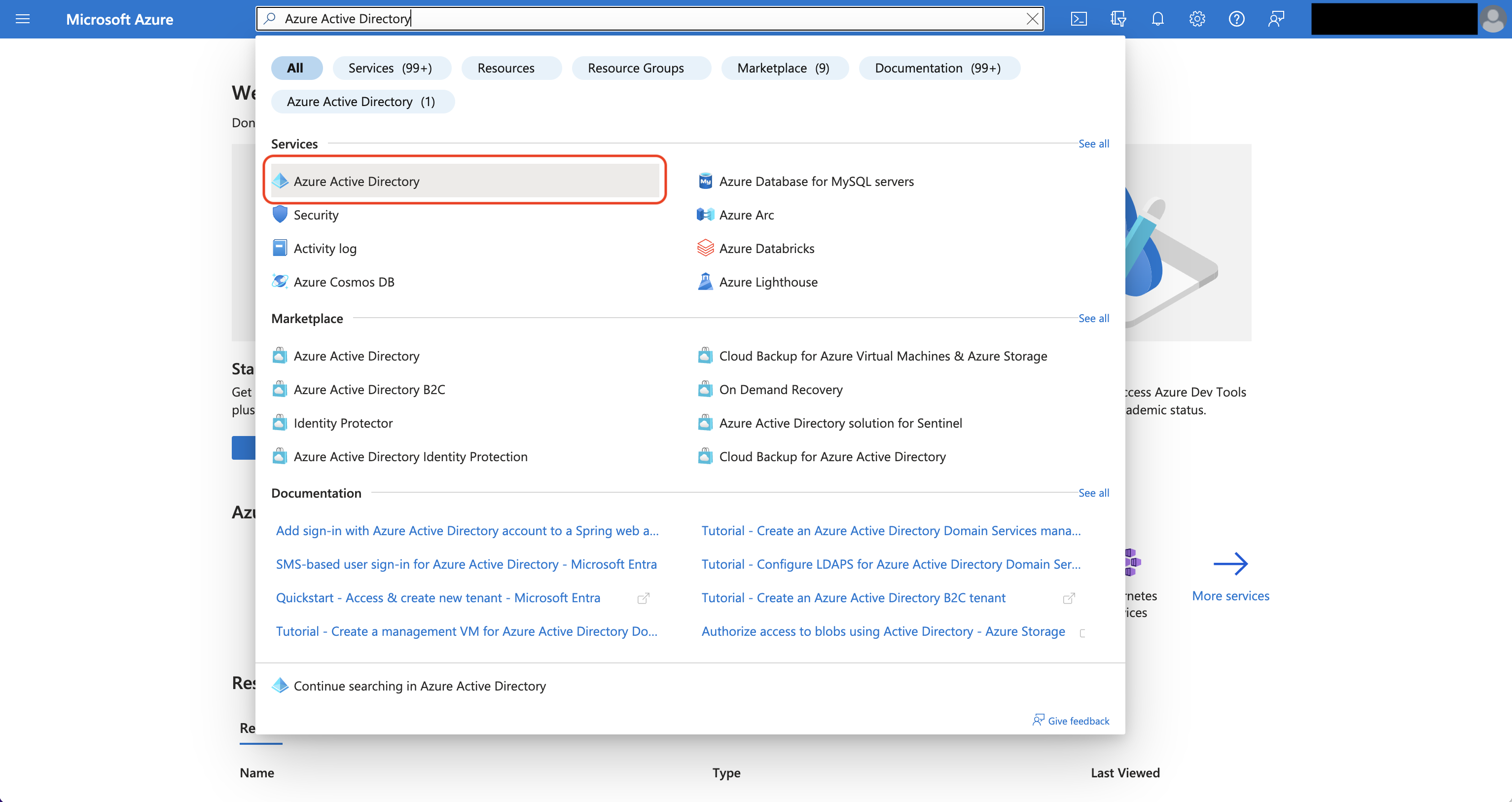
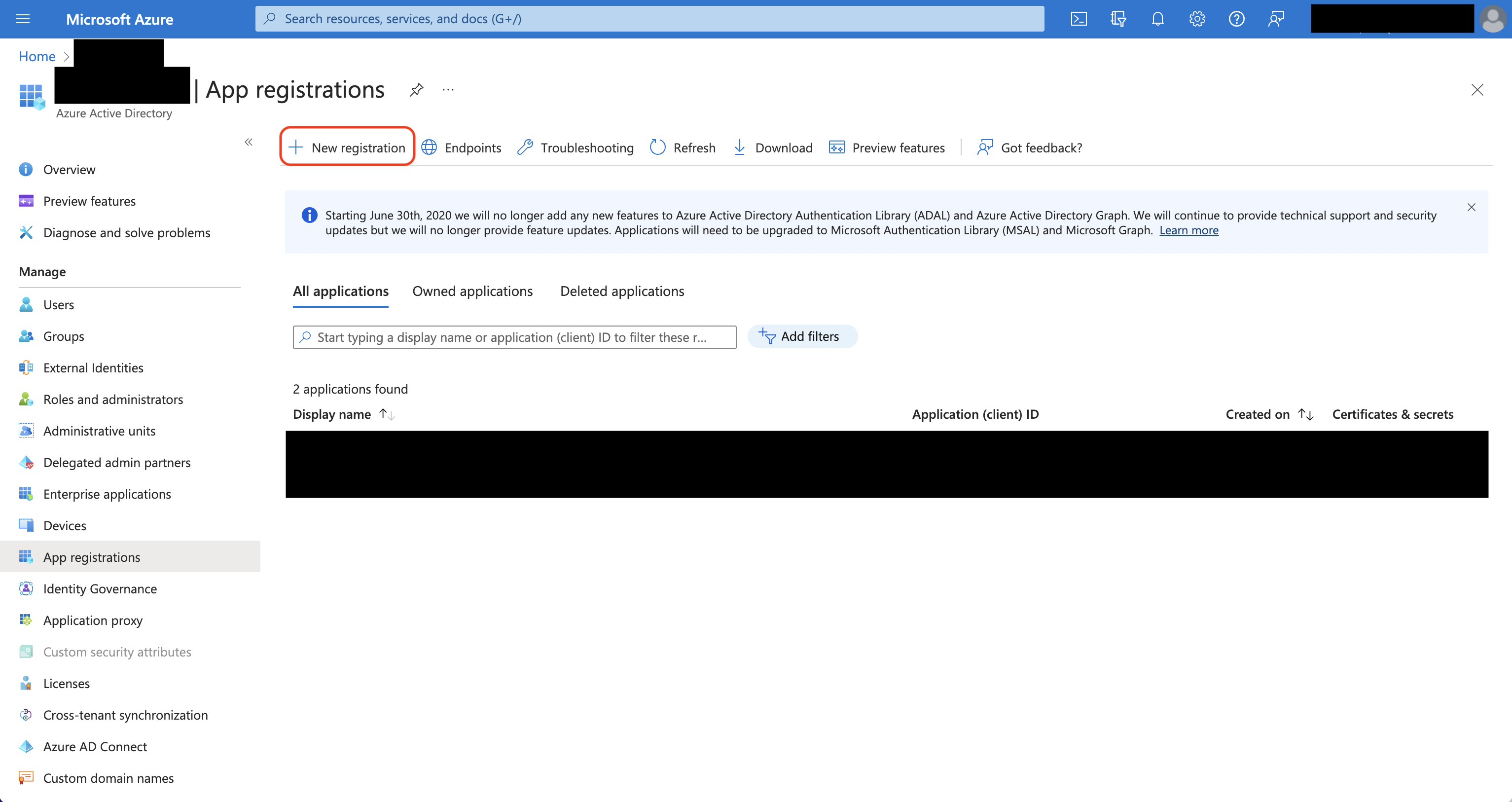
Azure Active Directory is now Microsoft Entra ID.
Create the application. As part of the form, set the Redirect URI to https://your-domain.com/organization/app-connections/azure/oauth/callback.
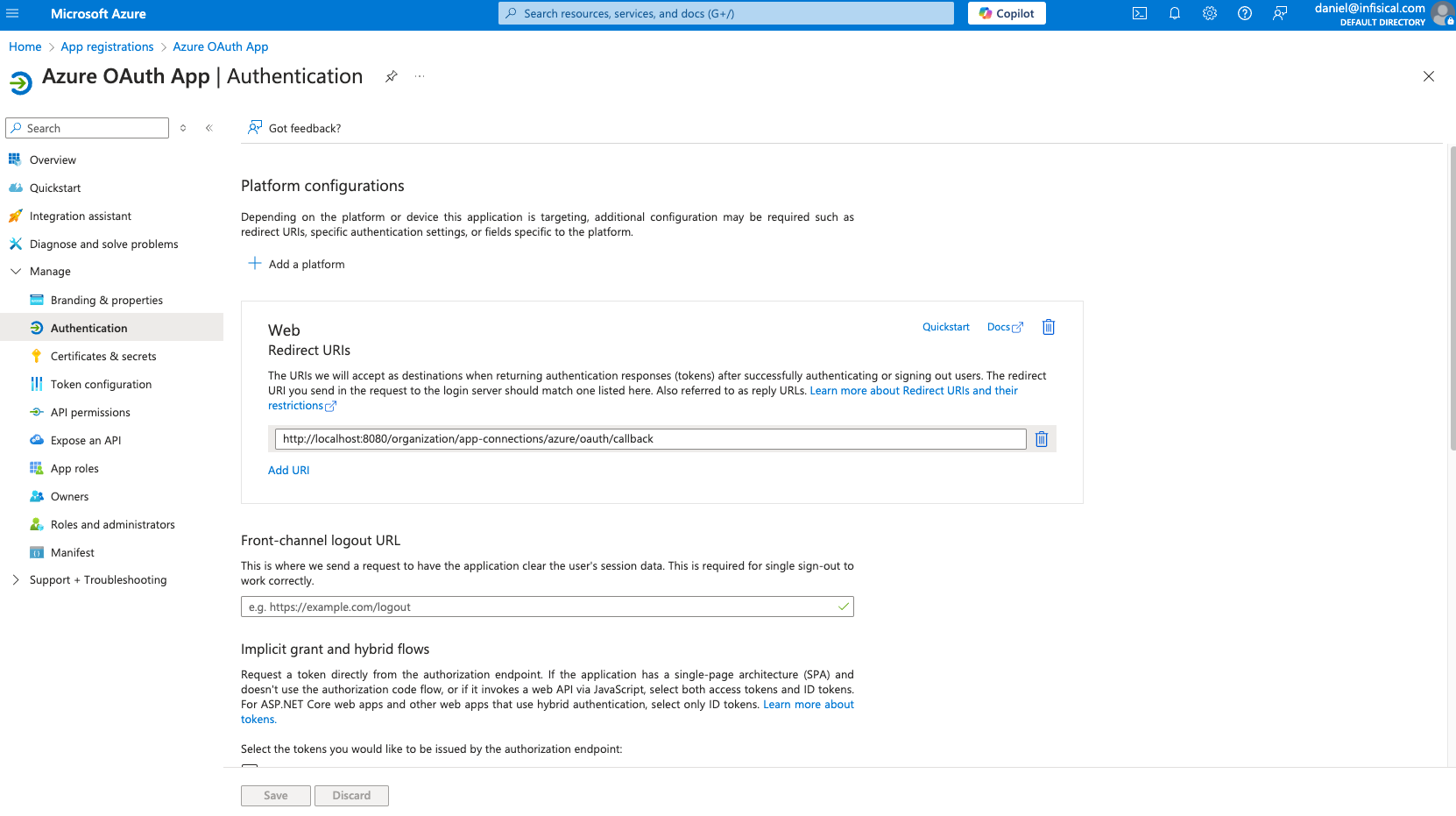
The domain you defined in the Redirect URI should be equivalent to the SITE_URL configured in your Infisical instance.
2
Assign API permissions to the application
For the Azure Connection to work with Key Vault, you need to assign multiple permissions to the application.
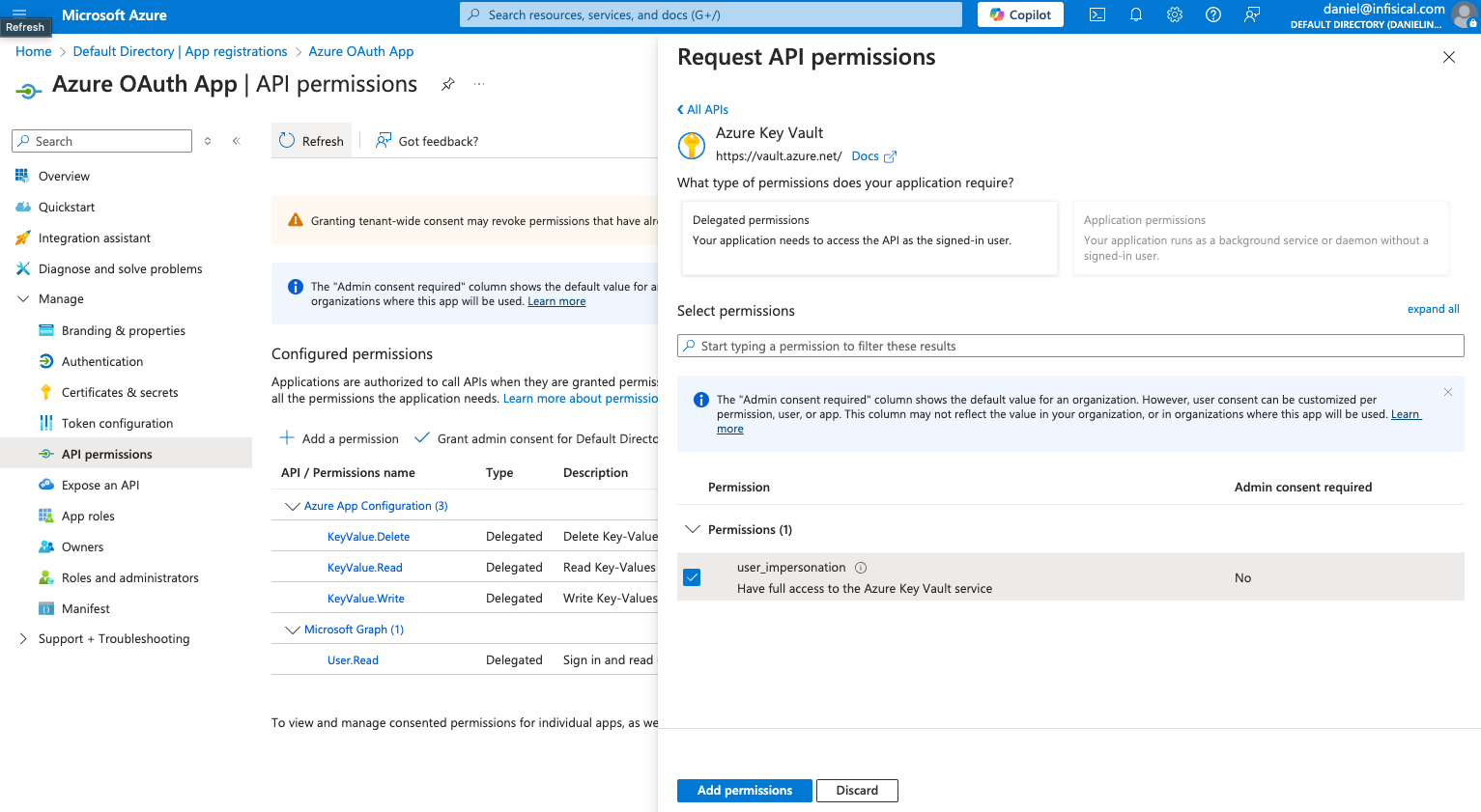
Set the API permissions of the Azure application to include user.impersonation for the Key Vault API.
3
Add your application credentials to Infisical
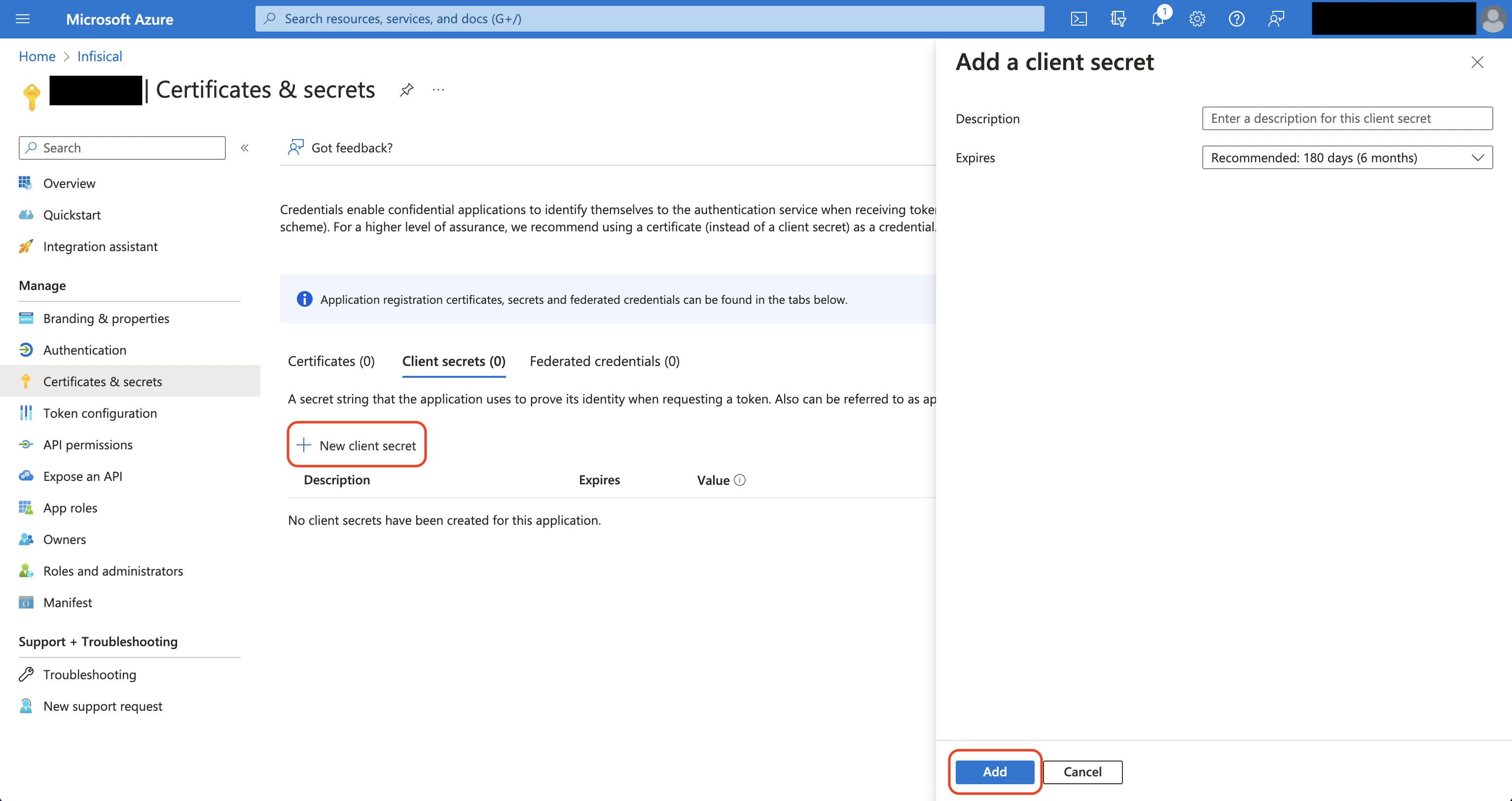
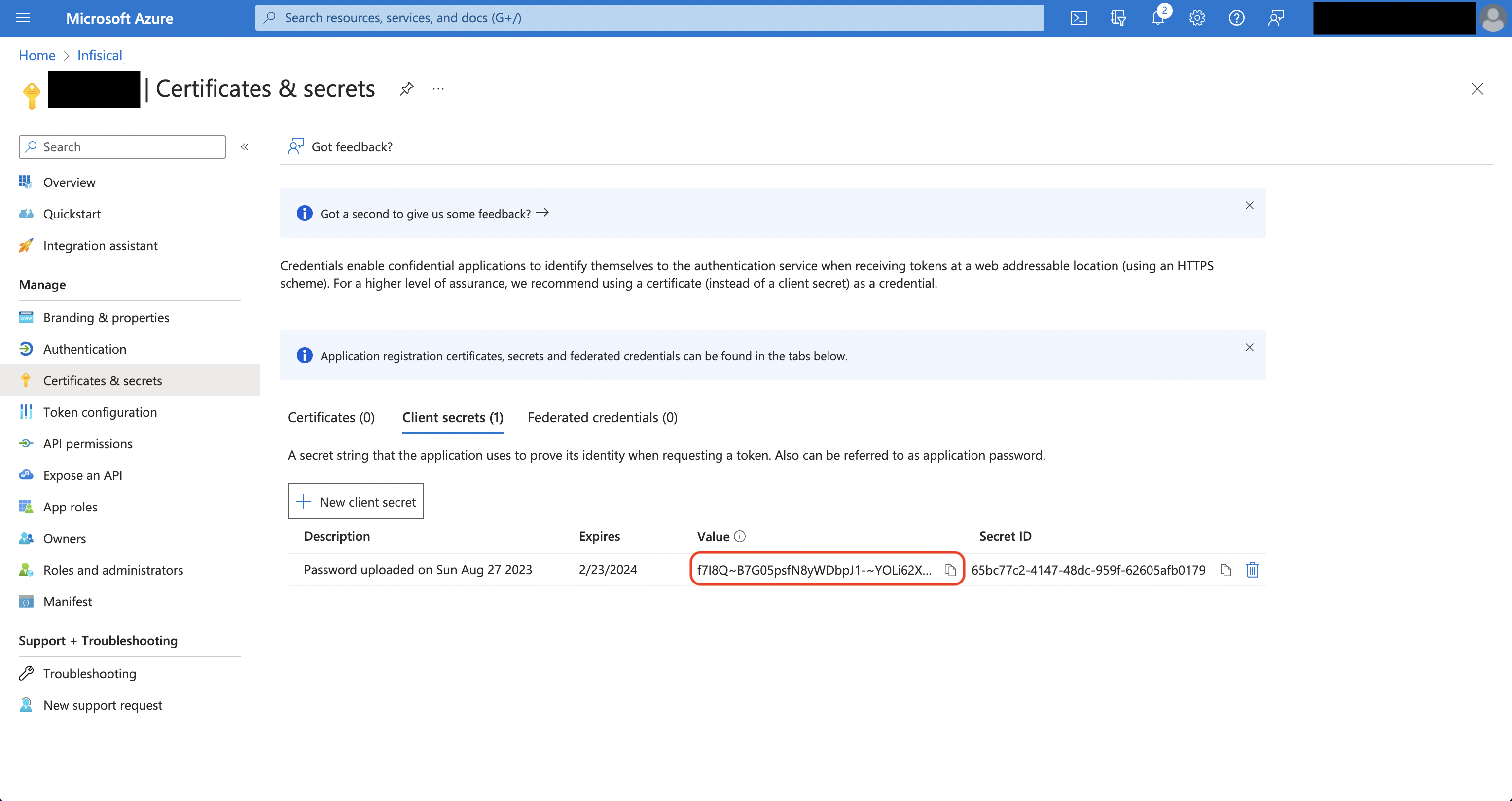
Obtain the Application (Client) ID in Overview and generate a Client Secret in Certificate & secrets for your Azure application.Back in your Infisical instance, add two new environment variables for the credentials of your Azure application.
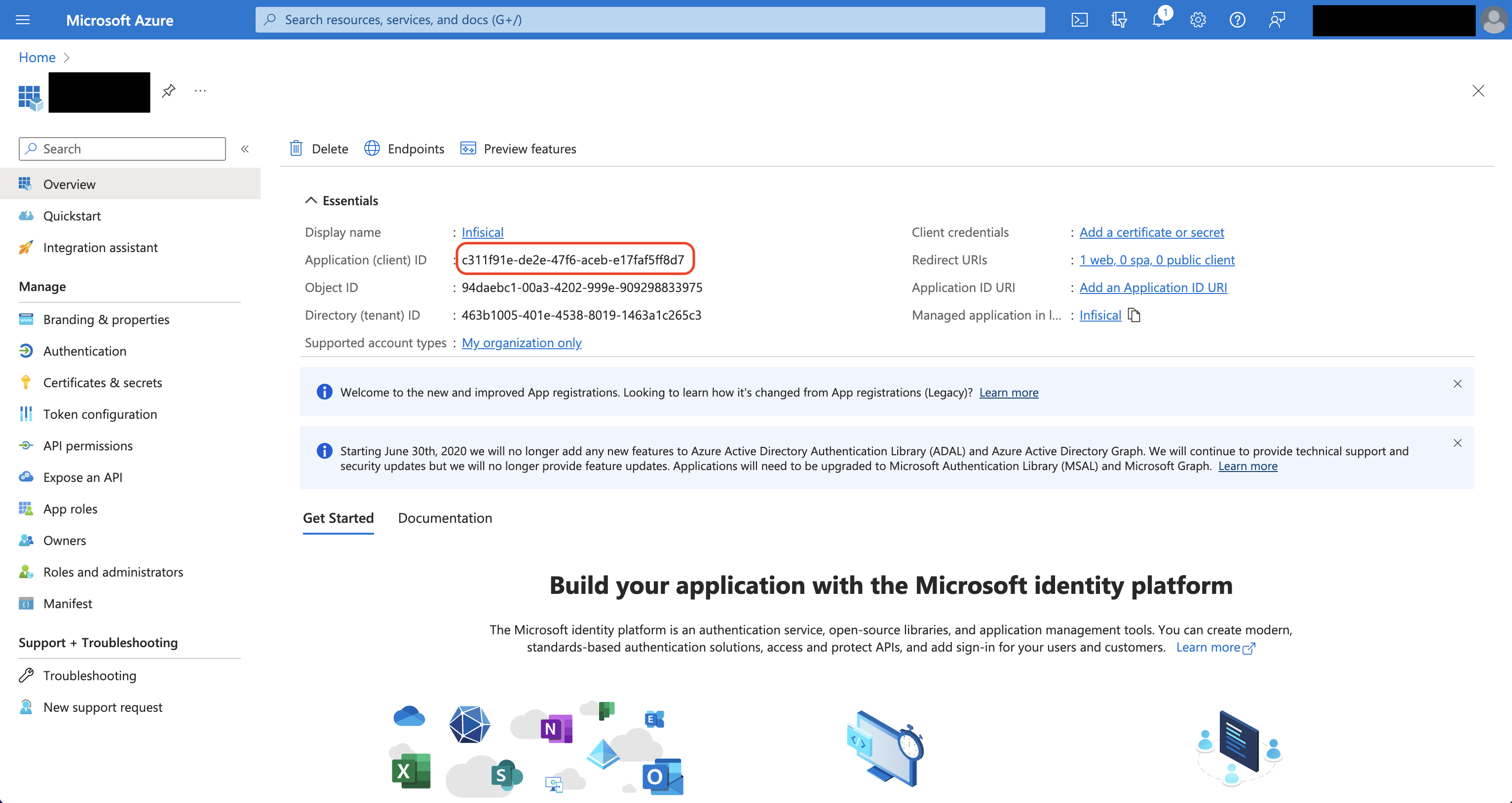
INF_APP_CONNECTION_AZURE_KEY_VAULT_CLIENT_ID: The Application (Client) ID of your Azure application.
INF_APP_CONNECTION_AZURE_KEY_VAULT_CLIENT_SECRET: The Client Secret of your Azure application.
Once added, restart your Infisical instance and use the Azure Key Vault connection.
Client Secret Authentication
To use client secret authentication, ensure your Azure Service Principal has the required permissions and is connected to the Azure Key Vault instances you want to use.Prerequisites:
Set up Azure and have an existing Key Vault instance.
The service principal must be connected to your target Azure Key Vault instance(s)
1
Assign API permissions to the service principal
Configure the required API permissions for your App Registration to interact with Azure Key Vault:
Set the API permissions of your Azure service principal to include user_impersonation for the Key Vault API.
If you want to configure automatic client secret rotation for this App Connection, you also need to grant either Application.ReadWrite.OwnedBy or Application.ReadWrite.All permissions.
Certificate Authentication
To use certificate authentication, ensure your Azure Service Principal has access to the Azure Key Vault instances you want to use. You’ll need a certificate uploaded to the App Registration and the matching private key kept locally.Prerequisites:
Set up Azure and have an existing Key Vault instance.
The service principal must be granted access to your target Azure Key Vault instance(s) via Access Policies or RBAC (e.g. the Key Vault Secrets Officer role).
A certificate (PEM) uploaded to your App Registration and the matching PEM private key.
1
Upload your certificate to your Azure App Registration
In the Azure Portal, navigate to your App Registration and open the Certificates & secrets section. Choose the Certificates tab and press the Upload certificate button. Select and upload your public certificate (PEM/CER/CRT).You will need both the certificate body and the matching private key (in PEM format) to configure the connection in Infisical.
Managed Identity Authentication
To use managed identity authentication, you need a user-assigned managed identity that can access the Azure Key Vault instances you want to use. Infisical doesn’t store a secret for this method.Prerequisites:
An existing Azure Key Vault instance
A user-assigned managed identity with access to your target Azure Key Vault instance(s) via Access Policies or RBAC (such as the Key Vault Secrets Officer role)
If you self-host Infisical, a SITE_URL that Azure can reach from the internet, because Azure fetches Infisical’s signing keys from it
Navigate to the Integrations tab in the desired project, then select App Connections.
2
Add Connection
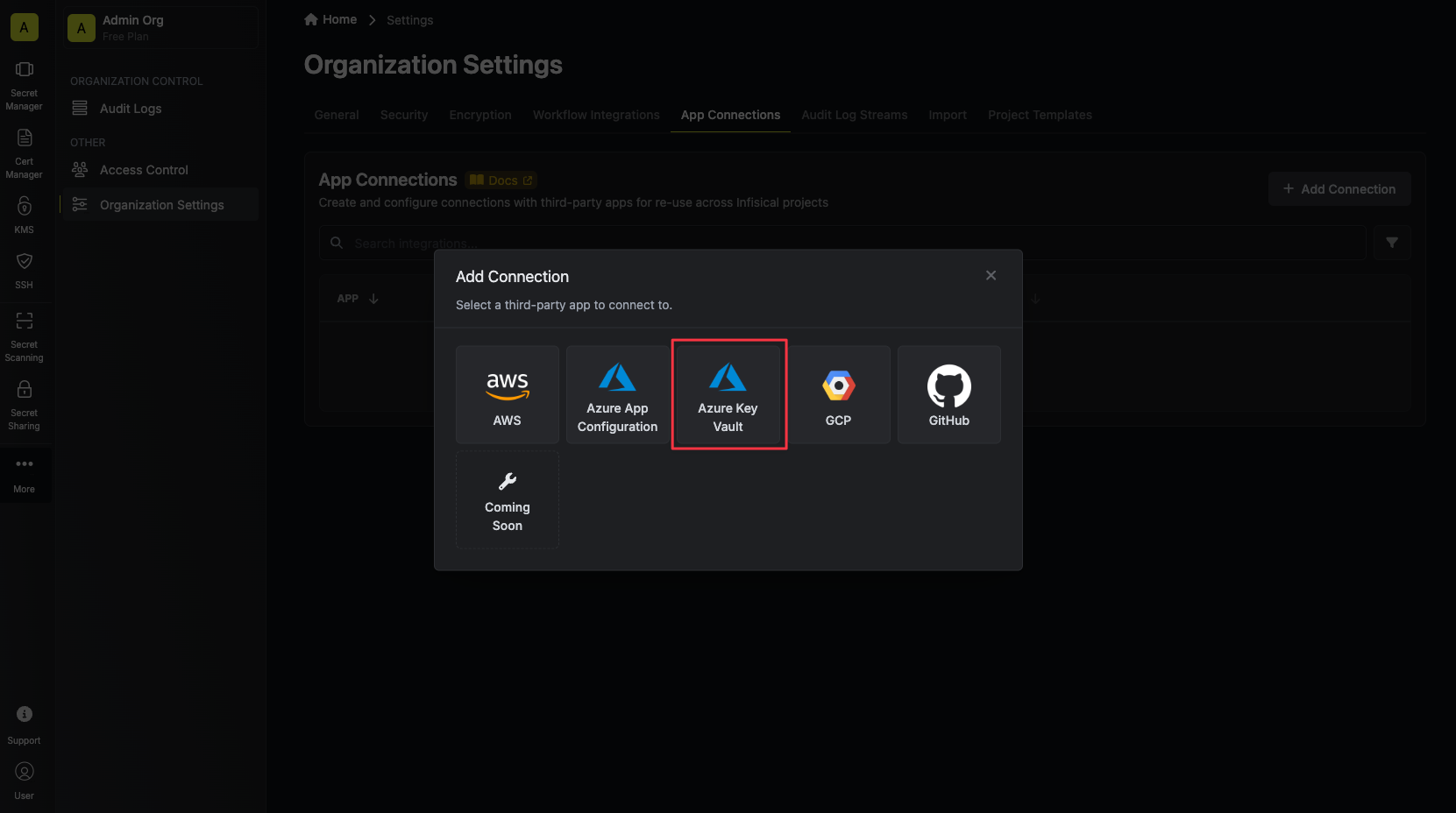
Select the Azure Connection option from the connection options modal.
3
Create Connection
OAuth
Client Secret
Certificate
Managed Identity
1
Authorize Connection
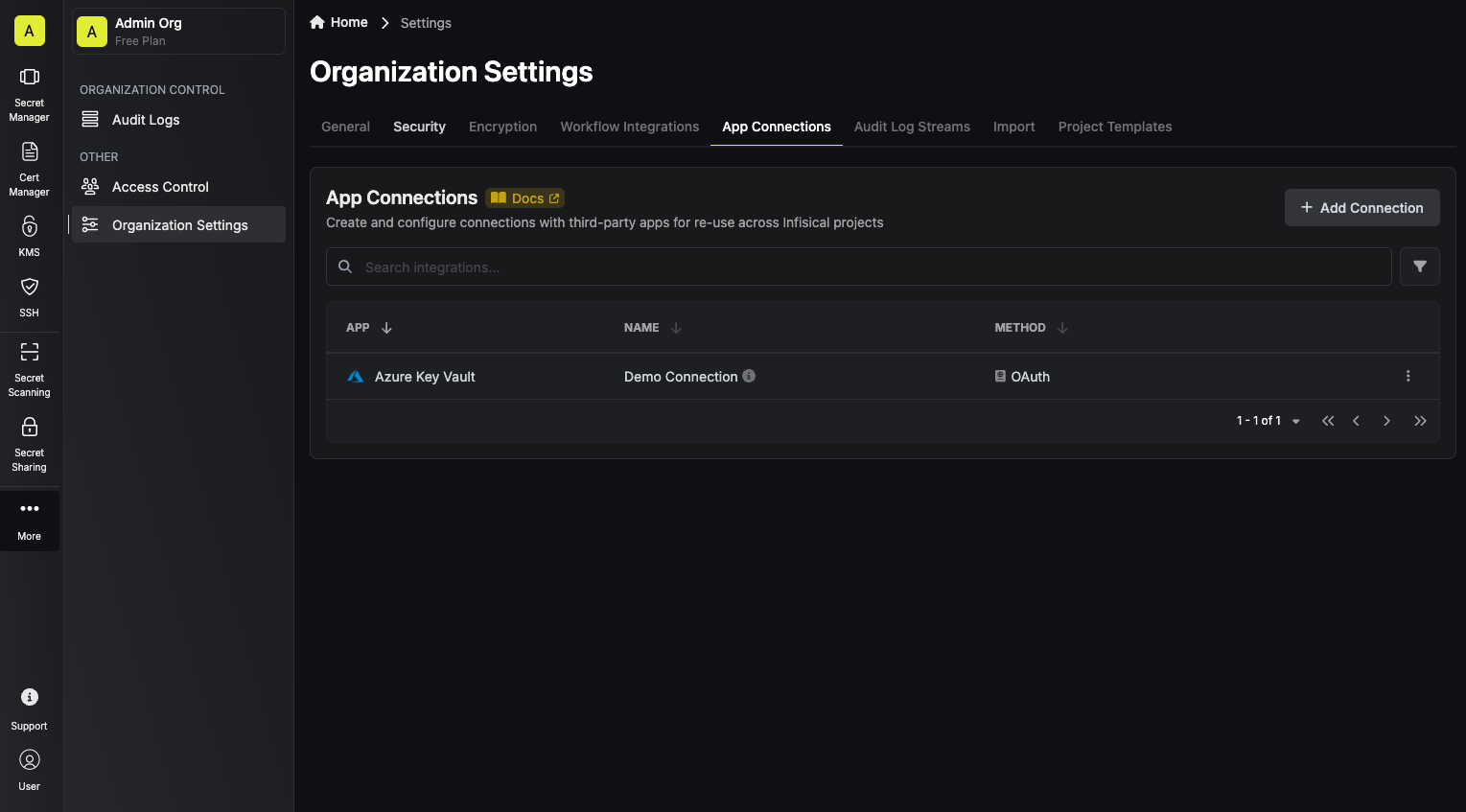
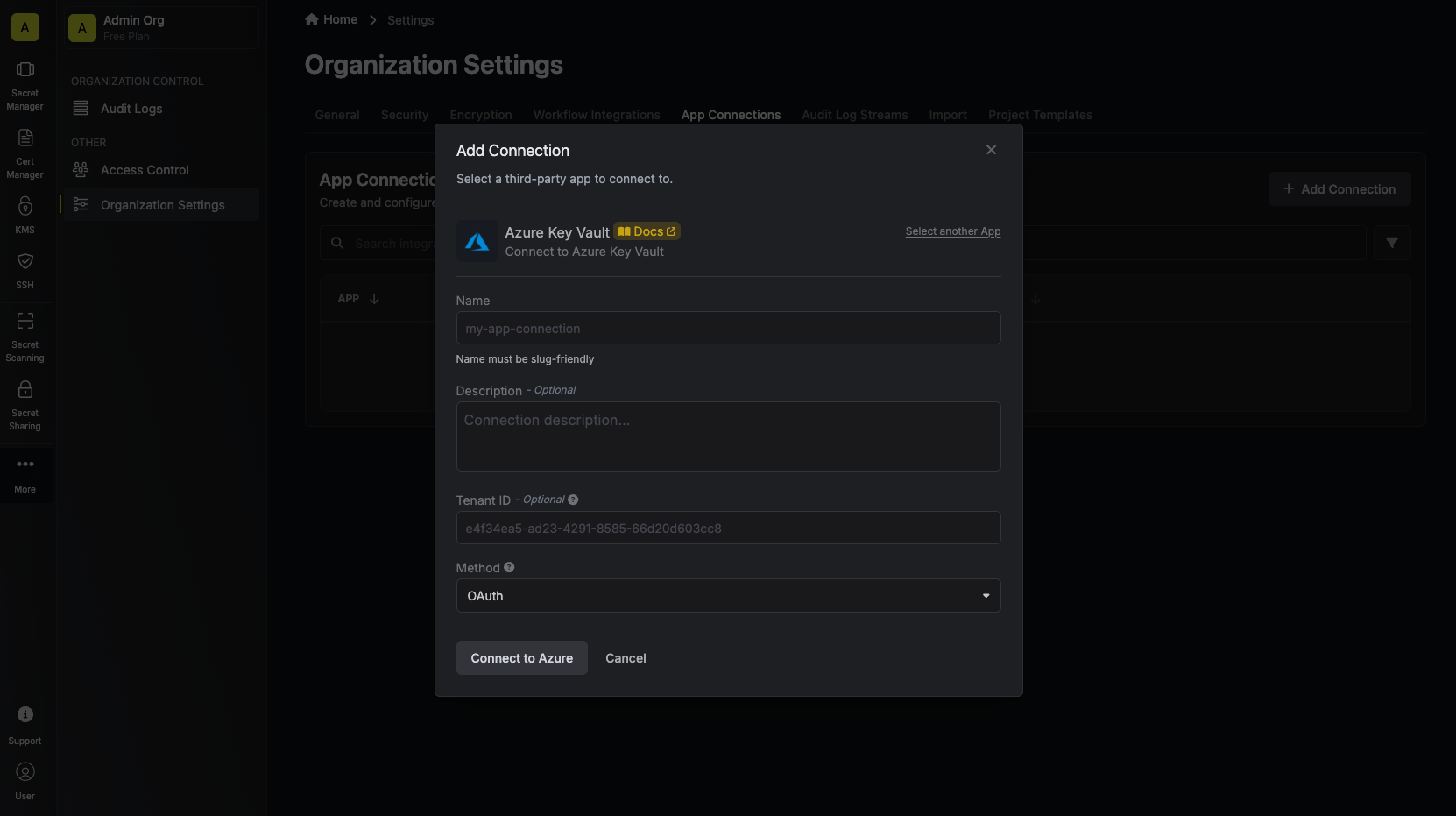
You can optionally authenticate against a specific tenant by providing the Azure Tenant or Directory ID.Now select the OAuth method and click Connect to Azure.
If you use Infisical Cloud, the OAuth flow requests every permission on Infisical’s shared Azure app registration (the .default scope), including the permissions for Azure App Configuration. If your Azure tenant doesn’t have the Azure App Configuration service principal, the OAuth flow fails. To create the service principal, run the following Azure CLI command, then try to connect again:
az ad sp create --id 35ffadb3-7fc1-497e-b61b-381d28e744cc
35ffadb3-7fc1-497e-b61b-381d28e744cc is the application ID that Microsoft assigns to Azure App Configuration, and it’s the same in every Azure tenant.
2
Grant Access
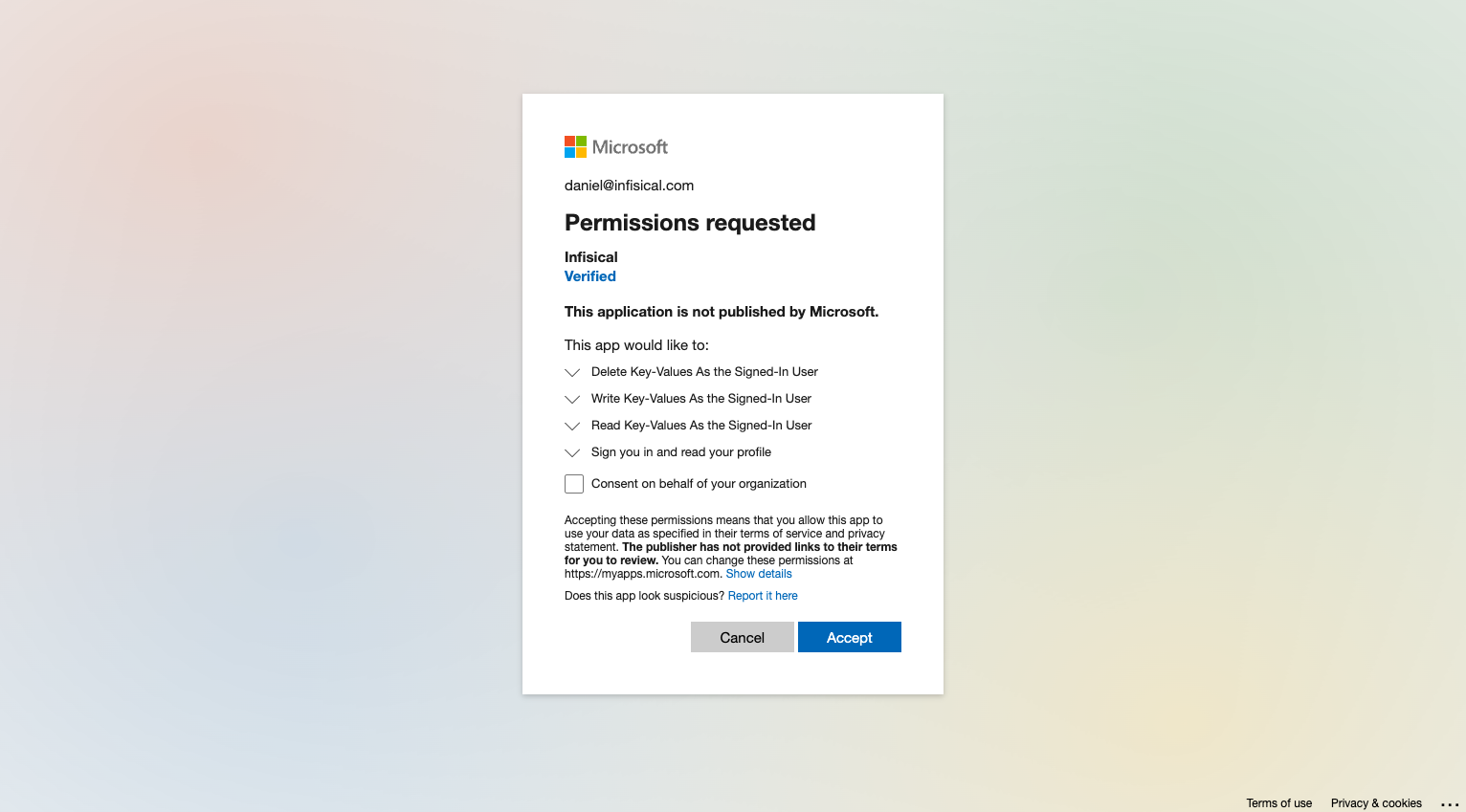
You will then be redirected to Azure to grant Infisical access to your Azure account. Once granted,
you will redirect you back to Infisical’s App Connections page.
1
Create Connection
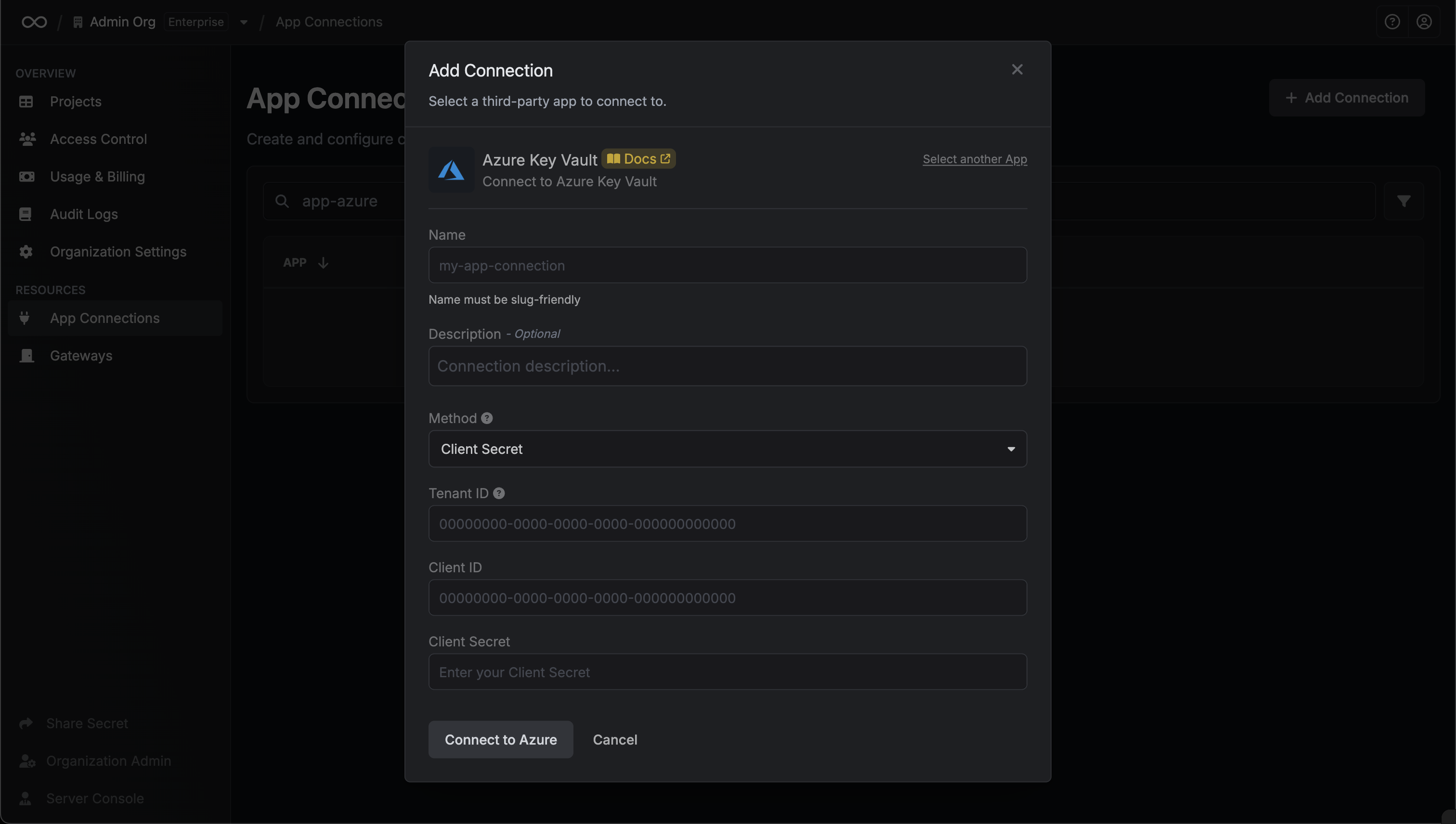
Fill in the Tenant ID, Client ID, Client Secret fields with the Directory (Tenant) ID, Application (Client) ID, Client Secret you obtained in the previous step.
You can optionally enable Automatic Credential Rotation for this connection. See the Automatic Credential Rotation section below for details.
1
Create Connection
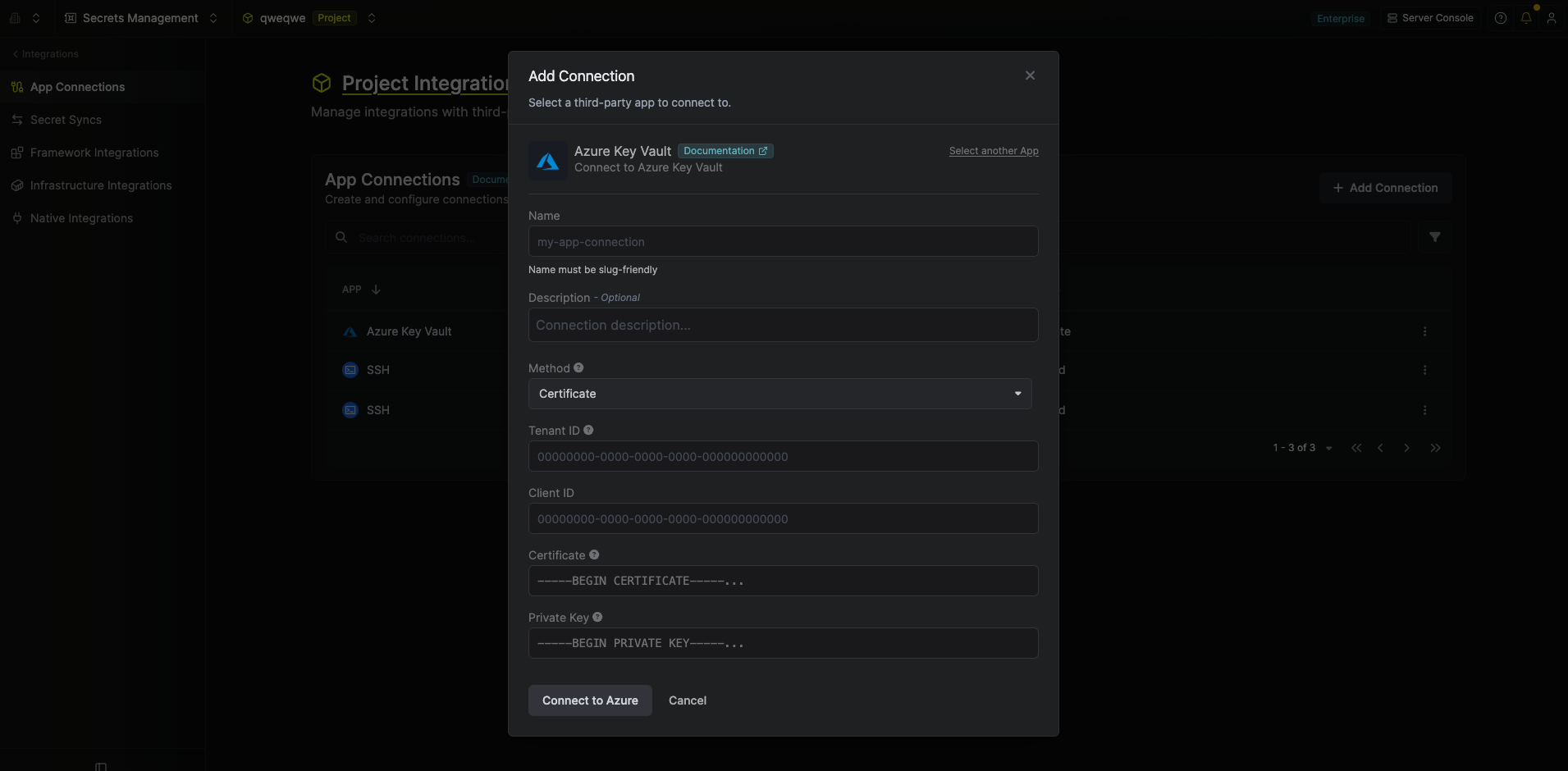
Select the Certificate method and fill in the following fields:
Tenant ID — the Directory (Tenant) ID of your Azure App Registration.
Client ID — the Application (Client) ID of your Azure App Registration.
Certificate — the PEM-encoded public certificate that was uploaded to the App Registration.
Private Key — the PEM-encoded private key matching the certificate above.
The private key is never transmitted to Azure; it is only used locally by Infisical to sign the client assertion used to authenticate with Azure.
Automatic Credential Rotation is not available for the Certificate authentication method.
1
Select the Managed Identity method, fill in the Tenant ID and Client ID of your managed identity, then select Configure Federated Credential. Infisical creates the connection and shows its Issuer, Subject Identifier, and Audience.
2
In the Azure portal, open your managed identity and go to Settings > Federated credentials > Add Credential. Choose the Other issuer scenario and enter the values from Infisical.
3
Back in Infisical, select Verify Connection.
If you create the connection through the create endpoint, the response includes these values in credentials.federatedCredential.
4
Connection Created
Your Azure Key Vault Connection is now available for use.
When using the Client Secret authentication method, Infisical can automatically rotate the Client Secret of your Azure application on a recurring schedule. When enabled, Infisical will immediately generate a new Client Secret on connection creation and revoke the original one, ensuring that no external party retains access using the credentials you provided.
Automatic Credential Rotation is only available for the Client Secret authentication method.
1
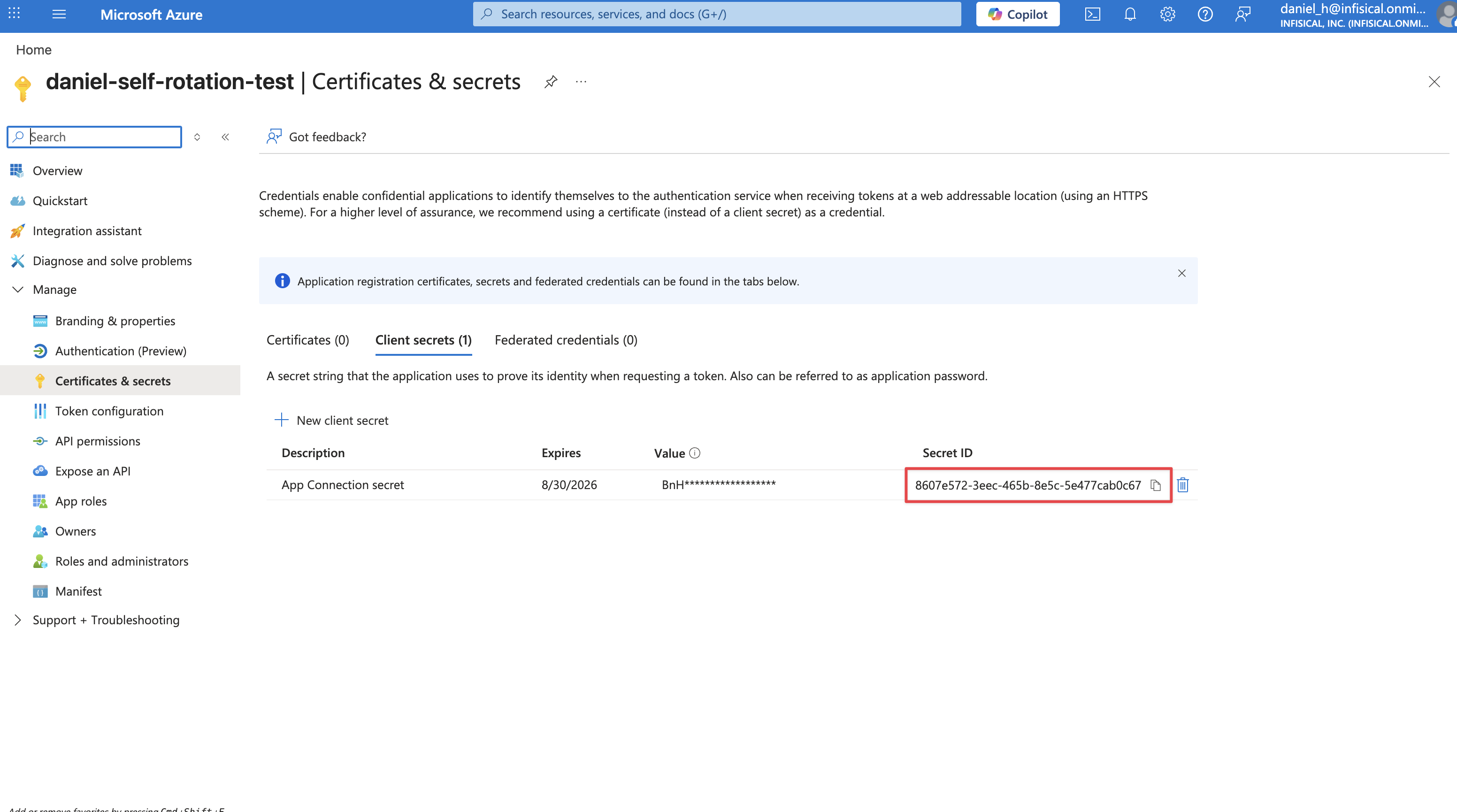
Locate the Key ID of your Client Secret
Before enabling rotation, you’ll need the Key ID of the Client Secret you’re using to authenticate. Navigate to your App Registration in the Azure Portal, then go to Certificates & secrets. Copy the Secret ID (Key ID) of the secret you’re providing to Infisical.
2
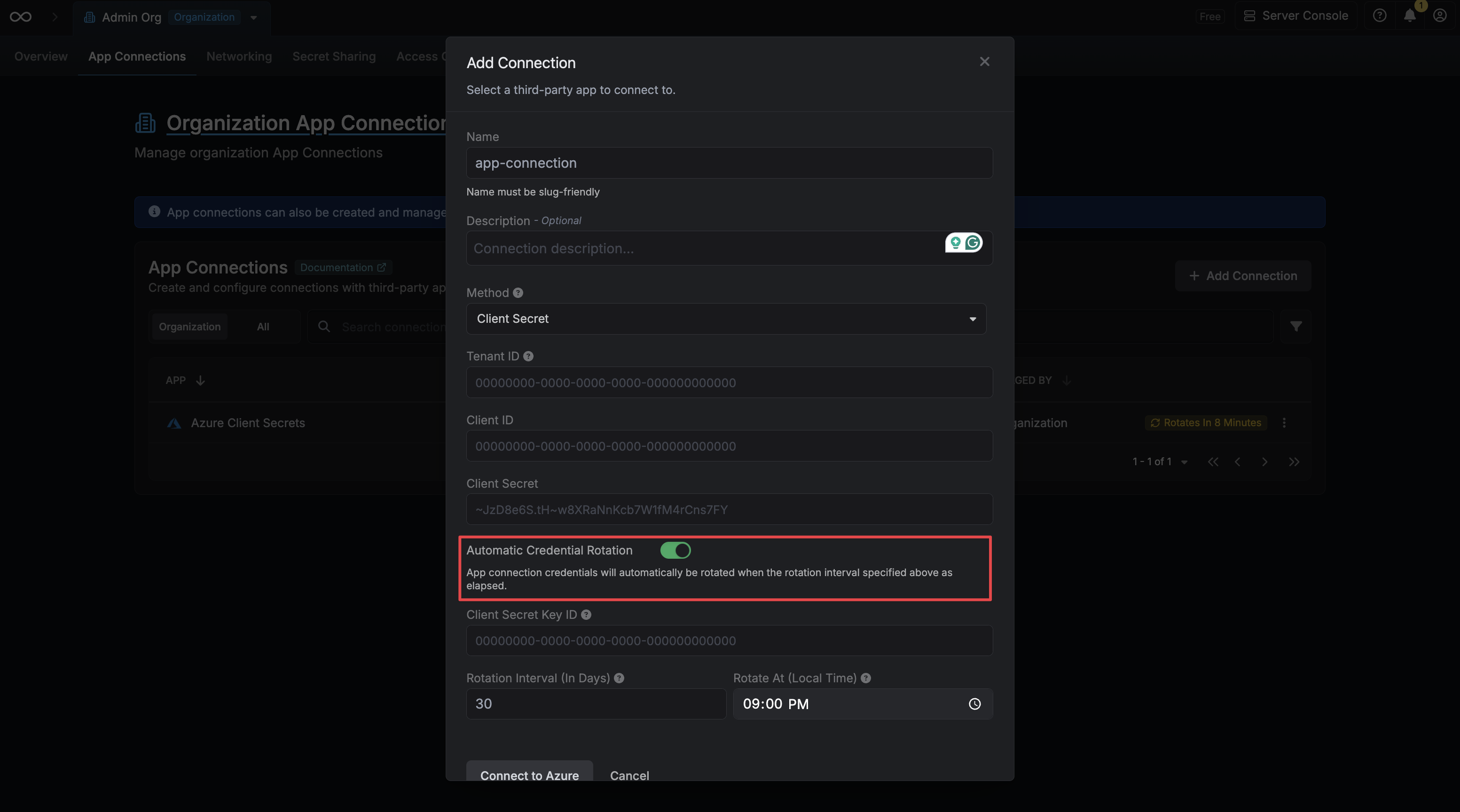
Enable Automatic Credential Rotation
When creating or editing your connection, toggle on the Automatic Credential Rotation switch.
3
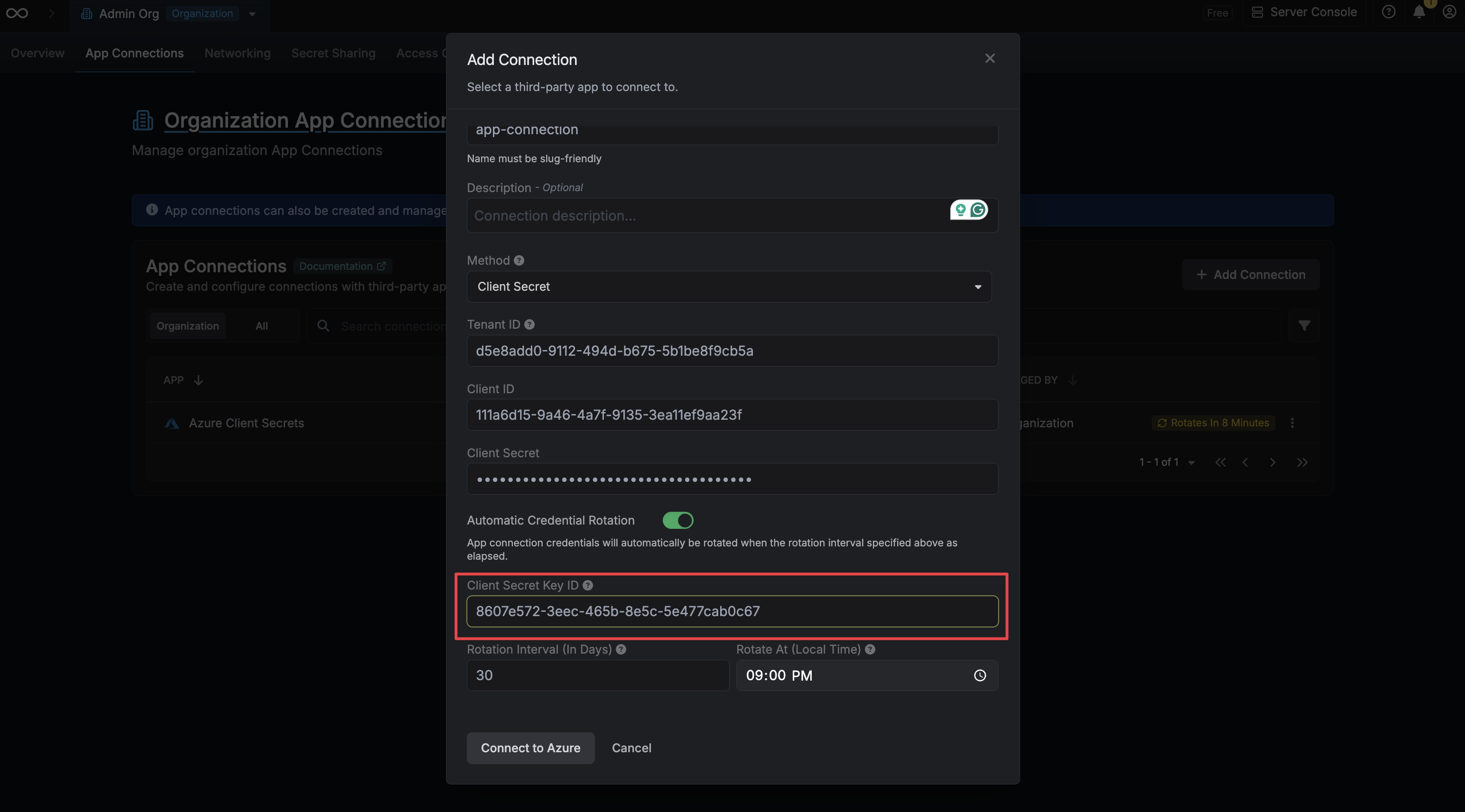
Provide the Client Secret Key ID
Enter the Key ID you copied in the previous step into the Client Secret Key ID field. Infisical uses this to revoke your original secret after generating a new one.
4
Configure the Rotation Schedule
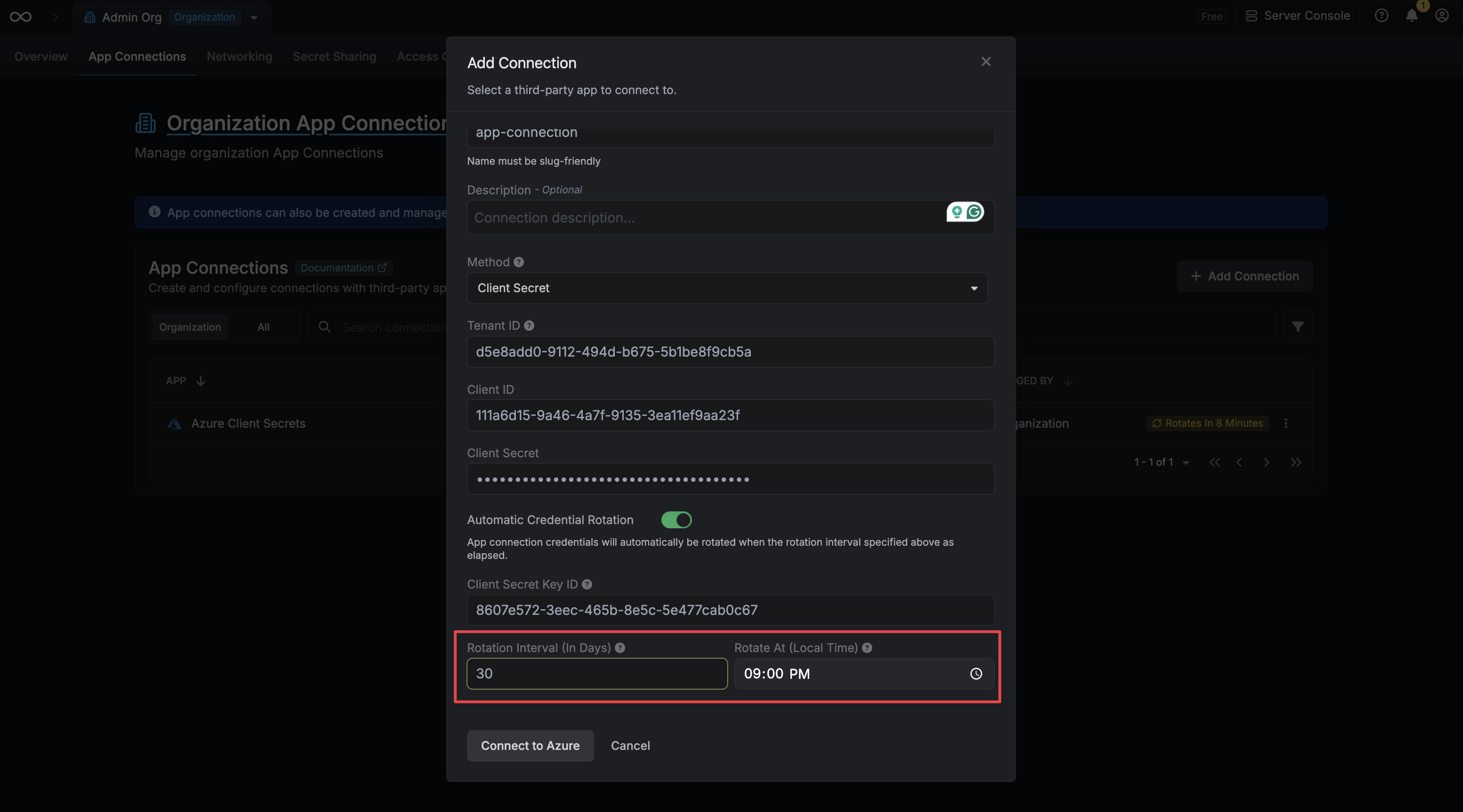
Set the Rotation Interval (in days) to define how often the credential should be rotated, and set Rotate At to the local time of day at which the rotation should occur.
Rotation Interval – How many days between each rotation.
Rotate At – The local time of day at which the rotation will be triggered.
{"docsConfig":{"theme":"aspen","$schema":"https://mintlify.com/docs.json","name":"Infisical","colors":{"primary":"#26272b","light":"#dbf530","dark":"#A1B659"},"logo":{"light":"https://mintlify.s3.us-west-1.amazonaws.com/infisical/logo/light.svg","dark":"https://mintlify.s3.us-west-1.amazonaws.com/infisical/logo/dark.svg","href":"/"},"favicon":"https://mintlify.s3.us-west-1.amazonaws.com/infisical/favicon.ico","api":{"openapi":"https://app.infisical.com/api/docs/json","mdx":{"server":["https://app.infisical.com"]}},"appearance":{"default":"light"},"background":{"color":{"light":"#ffffff","dark":"#08090b"}},"navbar":{"links":[{"href":"https://app.infisical.com/login","label":"Log In"}],"primary":{"type":"button","label":"Start for Free","href":"https://app.infisical.com/signup"}},"footer":{"socials":{"x":"https://www.twitter.com/infisical","linkedin":"https://www.linkedin.com/company/infisical","github":"https://github.com/Infisical/infisical-cli","website":"https://community.infisical.com"},"links":[{"header":"PRODUCT","items":[{"label":"Secrets Management","href":"https://infisical.com/platform/secrets-management"},{"label":"Certificate Management","href":"https://infisical.com/platform/certificate-management"},{"label":"Privileged Access Management (PAM)","href":"https://infisical.com/platform/pam"},{"label":"Agent Vault","href":"https://infisical.com/platform/agent-vault"},{"label":"Key Management Service (KMS)","href":"https://infisical.com/docs/documentation/platform/kms/overview"},{"label":"Secret Scanning","href":"https://infisical.com/radar"},{"label":"Share Secrets","href":"https://app.infisical.com/share-secret"},{"label":"Pricing","href":"https://infisical.com/pricing"},{"label":"Security","href":"https://infisical.com/docs/internals/security"},{"label":"Blog","href":"https://infisical.com/blog"},{"label":"Infisical vs Vault","href":"https://infisical.com/infisical-vs-hashicorp-vault"},{"label":"Community","href":"https://community.infisical.com/"}]},{"header":"USE CASES","items":[{"label":"Infisical Agent","href":"https://infisical.com/docs/documentation/getting-started/introduction"},{"label":"Infisical Proxy","href":"https://infisical.com/docs/integrations/platforms/infisical-proxy"},{"label":"Kubernetes","href":"https://infisical.com/docs/integrations/platforms/kubernetes"},{"label":"Dynamic Secrets","href":"https://infisical.com/docs/documentation/platform/dynamic-secrets/overview"},{"label":"Terraform","href":"https://registry.terraform.io/providers/Infisical/infisical/latest/docs"},{"label":"Ansible","href":"https://infisical.com/docs/integrations/platforms/ansible"},{"label":"Jenkins","href":"https://infisical.com/docs/integrations/cicd/jenkins"},{"label":"Docker","href":"https://infisical.com/docs/integrations/platforms/docker"},{"label":"AWS ECS","href":"https://infisical.com/docs/integrations/platforms/ecs-with-agent"},{"label":"GitLab","href":"https://infisical.com/docs/integrations/cicd/gitlab"},{"label":"GitHub","href":"https://infisical.com/docs/integrations/cicd/githubactions"},{"label":"SDK","href":"https://infisical.com/docs/sdks/overview"}]},{"header":"DEVELOPERS","items":[{"label":"Changelog","href":"https://github.com/Infisical/infisical/releases"},{"label":"Status","href":"https://status.infisical.com/"},{"label":"Feedback \u0026 Requests","href":"https://github.com/Infisical/infisical/issues"},{"label":"Trust of Center","href":"https://app.vanta.com/infisical.com/trust/hoop8cr78cuarxo9sztvs"},{"label":"Open Source Friends","href":"https://infisical.com/infisical-friends"},{"label":"How to contribute","href":"https://www.infisical.com/infisical-heroes"}]},{"header":"OTHERS","items":[{"label":"Customers","href":"https://infisical.com/customers/traba"},{"label":"Company Handbook","href":"https://infisical.com/wiki/handbook/overview"},{"label":"Careers","href":"https://infisical.com/careers"},{"label":"Terms of Service","href":"https://infisical.com/terms"},{"label":"Privacy Policy","href":"https://infisical.com/privacy"},{"label":"Subprocessors","href":"https://infisical.com/subprocessors"},{"label":"SLA","href":"https://infisical.com/sla"},{"label":"Support Email","href":"mailto:support@infisical.com"},{"label":"Sales","href":"mailto:sales@infisical.com"},{"label":"Support","href":"https://community.infisical.com"}]}]},"fonts":{"heading":{"family":"Alliance","weight":400,"source":"https://infisical.com/docs/fonts/AllianceNo2-Regular.woff2","format":"woff2"}},"icons":{"library":"lucide"},"styling":{"eyebrows":"breadcrumbs","codeblocks":"dark","latex":false},"integrations":{"posthog":{"apiKey":"phc_Q0xfB3LeOqo7ySk4DE6zLNwDzHFesKcmigknCy4fTdV","apiHost":"https://p.infisical.com"},"koala":{"publicApiKey":"pk_b50d7184e0e39ddd5cdb43cf6abeadd9b97d"},"gtm":{"tagId":"GTM-WL5C7MWT"}},"contextual":{"options":["assistant","copy","view","chatgpt","claude","mcp"],"display":"header"},"thumbnails":{"appearance":"light"},"navigation":{"pages":[]}},"deployment":{"deploymentMetadataValue":{"subdomain":"infisical","hasAudioNarration":false,"actualSubdomain":"infisical","customDomains":["infisical.com"],"gitSource":{"type":"github","owner":"infisical","repo":"infisical","deployBranch":"main","contentDirectory":"docs","mountPath":"","label":""},"chroma":{"liveDeploymentHistoryId":"6aea9be23ee6e0585cae8180","collectionId":"63edc978-e3a4-432e-8f43-9fe64c28122e","schemaVersion":"v3","latestBuiltDeploymentHistoryId":"6aea9be23ee6e0585cae8180"},"feedback":{"thumbs":true,"edits":true,"issues":true},"entitlements":{"AI_CHAT":{"status":"ENABLED"},"WEB_MCP":{"status":"ENABLED"},"NARRATION":{"status":"ENABLED"}},"buildId":"6aead34ffad8f0a23a5f3826","clientVersion":"0.0.4054","searchFilterCounts":[{"language":"default","tag":"Reference","count":1869},{"language":"default","tag":"API","count":1826},{"language":"default","tag":"Secrets Management","count":904},{"language":"default","tag":"App connections","count":655},{"language":"default","tag":"Shared","count":565},{"language":"default","tag":"Secret syncs","count":420},{"language":"default","tag":"Products","count":371},{"language":"default","tag":"Certificate Management","count":320},{"language":"default","tag":"Platform","count":248},{"language":"default","tag":"Secret rotations","count":213}]},"assistantConfig":{"enableAskAiButton":true,"enableAskAiSearchBar":false},"basePath":"/docs","hasChatPermissions":true,"hasWebMcpPermissions":true,"toggles":[{"name":"kill-isr","enabled":true,"variant":{"name":"disabled","enabled":false,"feature_enabled":true},"impressionData":false},{"name":"selectively-prewarm","enabled":true,"variant":{"name":"disabled","enabled":false,"feature_enabled":true},"impressionData":false},{"name":"agent-mintlify-slack","enabled":true,"variant":{"name":"disabled","enabled":false,"feature_enabled":true},"impressionData":false},{"name":"agent-integrations-settings","enabled":true,"variant":{"name":"disabled","enabled":false,"feature_enabled":true},"impressionData":false},{"name":"rbac-expansion","enabled":true,"variant":{"name":"disabled","enabled":false,"feature_enabled":true},"impressionData":false},{"name":"automations-pr-grouping","enabled":true,"variant":{"name":"disabled","enabled":false,"feature_enabled":true},"impressionData":false},{"name":"custom-prefix","enabled":true,"variant":{"name":"disabled","enabled":false,"feature_enabled":true},"impressionData":false},{"name":"analytics-v7","enabled":true,"variant":{"name":"disabled","enabled":false,"feature_enabled":true},"impressionData":false},{"name":"user-flows-analytics","enabled":true,"variant":{"name":"disabled","enabled":false,"feature_enabled":true},"impressionData":false},{"name":"no-publish-flow","enabled":true,"variant":{"name":"disabled","enabled":false,"feature_enabled":true},"impressionData":false},{"name":"workos-onboarding","enabled":true,"variant":{"name":"disabled","enabled":false,"feature_enabled":true},"impressionData":false},{"name":"llms-txt-v2","enabled":true,"variant":{"name":"disabled","enabled":false,"feature_enabled":true},"impressionData":false},{"name":"snapshot-serving-live","enabled":true,"variant":{"name":"disabled","enabled":false,"feature_enabled":true},"impressionData":false},{"name":"stripTemperatureMiddleware","enabled":true,"variant":{"name":"disabled","enabled":false,"feature_enabled":true},"impressionData":false},{"name":"support-platform-pylon-zendesk","enabled":true,"variant":{"name":"disabled","enabled":false,"feature_enabled":true},"impressionData":false},{"name":"snapshot-serving","enabled":true,"variant":{"name":"disabled","enabled":false,"feature_enabled":true},"impressionData":false},{"name":"instant-rollback","enabled":true,"variant":{"name":"disabled","enabled":false,"feature_enabled":true},"impressionData":false},{"name":"granular-notifications-server","enabled":true,"variant":{"name":"disabled","enabled":false,"feature_enabled":true},"impressionData":false},{"name":"granular-notifications","enabled":true,"variant":{"name":"disabled","enabled":false,"feature_enabled":true},"impressionData":false},{"name":"automations-fable","enabled":true,"variant":{"name":"disabled","enabled":false,"feature_enabled":true},"impressionData":false},{"name":"fixed-ai-action-pricing","enabled":true,"variant":{"name":"disabled","enabled":false,"feature_enabled":true},"impressionData":false},{"name":"automation-resolve-merge-conflict","enabled":true,"variant":{"name":"disabled","enabled":false,"feature_enabled":true},"impressionData":false},{"name":"scoped-publishing","enabled":true,"variant":{"name":"disabled","enabled":false,"feature_enabled":true},"impressionData":false},{"name":"mintql","enabled":true,"variant":{"name":"disabled","enabled":false,"feature_enabled":true},"impressionData":false},{"name":"page-level-analytics","enabled":true,"variant":{"name":"disabled","enabled":false,"feature_enabled":true},"impressionData":false},{"name":"editor-version-history-v2","enabled":true,"variant":{"name":"disabled","enabled":false,"feature_enabled":true},"impressionData":false},{"name":"instinct-self-updating-docs","enabled":true,"variant":{"name":"disabled","enabled":false,"feature_enabled":true},"impressionData":false},{"name":"billing-page-v2","enabled":true,"variant":{"name":"disabled","enabled":false,"feature_enabled":true},"impressionData":false},{"name":"full-page-search","enabled":true,"variant":{"name":"disabled","enabled":false,"feature_enabled":true},"impressionData":false},{"name":"workspace-projects","enabled":true,"variant":{"name":"disabled","enabled":false,"feature_enabled":true},"impressionData":false},{"name":"assistant-v5","enabled":true,"variant":{"name":"disabled","enabled":false,"feature_enabled":true},"impressionData":false},{"name":"byok-sep-25","enabled":true,"variant":{"name":"disabled","enabled":false,"feature_enabled":true},"impressionData":false},{"name":"fork-pr-previews","enabled":true,"variant":{"name":"disabled","enabled":false,"feature_enabled":true},"impressionData":false},{"name":"revalidation-jwt","enabled":true,"variant":{"name":"disabled","enabled":false,"feature_enabled":true},"impressionData":false},{"name":"vite-origin","enabled":true,"variant":{"name":"disabled","enabled":false,"feature_enabled":true},"impressionData":false},{"name":"billing-updated-9-15","enabled":true,"variant":{"name":"disabled","enabled":false,"feature_enabled":true},"impressionData":false},{"name":"workos-sso-scim","enabled":true,"variant":{"name":"disabled","enabled":false,"feature_enabled":true},"impressionData":false},{"name":"hobby-abuse-scan","enabled":true,"variant":{"name":"disabled","enabled":false,"feature_enabled":true},"impressionData":false},{"name":"dashboard-inbox","enabled":true,"variant":{"name":"disabled","enabled":false,"feature_enabled":true},"impressionData":false},{"name":"workos-signup","enabled":true,"variant":{"name":"disabled","enabled":false,"feature_enabled":true},"impressionData":false},{"name":"turbopuffer-dual-write","enabled":true,"variant":{"name":"disabled","enabled":false,"feature_enabled":true},"impressionData":false},{"name":"workos-enabled","enabled":true,"variant":{"name":"disabled","enabled":false,"feature_enabled":true},"impressionData":false},{"name":"approve-review-flow","enabled":true,"variant":{"name":"disabled","enabled":false,"feature_enabled":true},"impressionData":false},{"name":"sso-setup-deadline-banner","enabled":true,"variant":{"name":"disabled","enabled":false,"feature_enabled":true},"impressionData":false}],"googleFontsInlined":false},"customCss":[{"filePath":"style.css","href":"/docs/_mintlify/custom/infisical/c99f312c2d951499/style.css"}],"page":{"pagePath":"integrations/app-connections/azure-key-vault","slug":"/integrations/app-connections/azure-key-vault","pageMetadata":{"title":"Azure Key Vault connection","sidebarTitle":"Azure Key Vault","description":"Learn how to configure a Azure Key Vault Connection for Infisical.","href":"/integrations/app-connections/azure-key-vault"},"description":{"compiledSource":"\"use strict\";\nconst {jsx: _jsx} = arguments[0];\nconst {useMDXComponents: _provideComponents} = arguments[0];\nfunction _createMdxContent(props) {\n const _components = {\n p: \"p\",\n ..._provideComponents(),\n ...props.components\n };\n return _jsx(_components.p, {\n children: \"Learn how to configure a Azure Key Vault Connection for Infisical.\"\n });\n}\nfunction MDXContent(props = {}) {\n const {wrapper: MDXLayout} = {\n ..._provideComponents(),\n ...props.components\n };\n return MDXLayout ? _jsx(MDXLayout, {\n ...props,\n children: _jsx(_createMdxContent, {\n ...props\n })\n }) : _createMdxContent(props);\n}\nreturn {\n default: MDXContent\n};\n","frontmatter":{},"scope":{}},"pageType":"default","mdx":{"mdxSource":{"compiledSource":"\"use strict\";const{Fragment:_Fragment,jsx:_jsx,jsxs:_jsxs}=arguments[0];const{useMDXComponents:_provideComponents}=arguments[0];function _createMdxContent(props){const _components={a:`a`,code:`code`,li:`li`,p:`p`,pre:`pre`,span:`span`,strong:`strong`,ul:`ul`,..._provideComponents(),...props.components},{Accordion,CodeBlock,Heading,Info,Note,OptimizedImage,Step,Steps,Tab,Tabs,Tip}=_components;if(!Accordion)_missingMdxReference(`Accordion`,true);if(!CodeBlock)_missingMdxReference(`CodeBlock`,true);if(!Heading)_missingMdxReference(`Heading`,true);if(!Info)_missingMdxReference(`Info`,true);if(!Note)_missingMdxReference(`Note`,true);if(!OptimizedImage)_missingMdxReference(`OptimizedImage`,true);if(!Step)_missingMdxReference(`Step`,true);if(!Steps)_missingMdxReference(`Steps`,true);if(!Tab)_missingMdxReference(`Tab`,true);if(!Tabs)_missingMdxReference(`Tabs`,true);if(!Tip)_missingMdxReference(`Tip`,true);return _jsxs(_Fragment,{children:[_jsx(_components.p,{children:`Infisical supports four methods for connecting to Azure Key Vault: OAuth, Client Secret, Certificate (SPN with certificate), and Managed Identity.`}),`\n`,_jsxs(Accordion,{title:`Self-Hosted Instance`,id:`self-hosted-instance`,children:[_jsx(_components.p,{children:`Using the Azure Key Vault connection on a self-hosted instance of Infisical requires configuring an application in Azure\nand registering your instance with it.`}),_jsx(_components.p,{children:_jsx(_components.strong,{children:`Prerequisites:`})}),_jsxs(_components.ul,{children:[`\n`,_jsx(_components.li,{children:`Set up Azure and have an existing Key Vault instance.`}),`\n`]}),_jsxs(Steps,{children:[_jsxs(Step,{title:`Create an application in Azure`,children:[_jsx(_components.p,{children:`Navigate to Entra ID > App registrations to create a new application.`}),_jsx(Info,{children:_jsx(_components.p,{children:`Azure Active Directory is now Microsoft Entra ID.`})}),_jsx(OptimizedImage,{src:`https://mintlify.s3.us-west-1.amazonaws.com/infisical/images/integrations/azure-app-configuration/config-aad.png`,alt:`Azure Key Vault`}),_jsx(OptimizedImage,{src:`https://mintlify.s3.us-west-1.amazonaws.com/infisical/images/integrations/azure-app-configuration/config-new-app.png`,alt:`Azure Key Vault`}),_jsxs(_components.p,{children:[`Create the application. As part of the form, set the `,_jsx(_components.strong,{children:`Redirect URI`}),` to `,_jsx(_components.code,{children:`https://your-domain.com/organization/app-connections/azure/oauth/callback`}),`.`]}),_jsx(Tip,{children:_jsxs(_components.p,{children:[`The domain you defined in the Redirect URI should be equivalent to the `,_jsx(_components.code,{children:`SITE_URL`}),` configured in your Infisical instance.`]})}),_jsx(OptimizedImage,{src:`https://mintlify.s3.us-west-1.amazonaws.com/infisical/images/app-connections/azure/register-callback.png`,alt:`Azure Key Vault`})]}),_jsxs(Step,{title:`Assign API permissions to the application`,children:[_jsx(_components.p,{children:`For the Azure Connection to work with Key Vault, you need to assign multiple permissions to the application.`}),_jsx(Heading,{level:`4`,id:`azure-key-vault-permissions`,children:`Azure Key Vault permissions`}),_jsxs(_components.p,{children:[`Set the API permissions of the Azure application to include `,_jsx(_components.code,{children:`user.impersonation`}),` for the Key Vault API.`]}),_jsx(OptimizedImage,{src:`https://mintlify.s3.us-west-1.amazonaws.com/infisical/images/app-connections/azure/keyvault-azure-permissions.png`,alt:`Azure Key Vault`})]}),_jsxs(Step,{title:`Add your application credentials to Infisical`,children:[_jsxs(_components.p,{children:[`Obtain the `,_jsx(_components.strong,{children:`Application (Client) ID`}),` in Overview and generate a `,_jsx(_components.strong,{children:`Client Secret`}),` in Certificate \u0026 secrets for your Azure application.`]}),_jsx(OptimizedImage,{src:`https://mintlify.s3.us-west-1.amazonaws.com/infisical/images/integrations/azure-app-configuration/config-credentials-1.png`,alt:`Azure Key Vault`}),_jsx(OptimizedImage,{src:`https://mintlify.s3.us-west-1.amazonaws.com/infisical/images/integrations/azure-app-configuration/config-credentials-2.png`,alt:`Azure Key Vault`}),_jsx(OptimizedImage,{src:`https://mintlify.s3.us-west-1.amazonaws.com/infisical/images/integrations/azure-app-configuration/config-credentials-3.png`,alt:`Azure Key Vault`}),_jsx(_components.p,{children:`Back in your Infisical instance, add two new environment variables for the credentials of your Azure application.`}),_jsxs(_components.ul,{children:[`\n`,_jsxs(_components.li,{children:[_jsx(_components.code,{children:`INF_APP_CONNECTION_AZURE_KEY_VAULT_CLIENT_ID`}),`: The `,_jsx(_components.strong,{children:`Application (Client) ID`}),` of your Azure application.`]}),`\n`,_jsxs(_components.li,{children:[_jsx(_components.code,{children:`INF_APP_CONNECTION_AZURE_KEY_VAULT_CLIENT_SECRET`}),`: The `,_jsx(_components.strong,{children:`Client Secret`}),` of your Azure application.`]}),`\n`]}),_jsx(_components.p,{children:`Once added, restart your Infisical instance and use the Azure Key Vault connection.`})]})]})]}),`\n`,_jsxs(Accordion,{title:`Client Secret Authentication`,id:`client-secret-authentication`,children:[_jsx(_components.p,{children:`To use client secret authentication, ensure your Azure Service Principal has the required permissions and is connected to the Azure Key Vault instances you want to use.`}),_jsx(_components.p,{children:_jsx(_components.strong,{children:`Prerequisites:`})}),_jsxs(_components.ul,{children:[`\n`,_jsx(_components.li,{children:`Set up Azure and have an existing Key Vault instance.`}),`\n`,_jsx(_components.li,{children:`The service principal must be connected to your target Azure Key Vault instance(s)`}),`\n`]}),_jsx(Steps,{children:_jsxs(Step,{title:`Assign API permissions to the service principal`,children:[_jsx(_components.p,{children:`Configure the required API permissions for your App Registration to interact with Azure Key Vault:`}),_jsx(Heading,{level:`4`,id:`azure-key-vault-permissions-2`,children:`Azure Key Vault permissions`}),_jsxs(_components.p,{children:[`Set the API permissions of your Azure service principal to include `,_jsx(_components.code,{children:`user_impersonation`}),` for the Key Vault API.`]}),_jsx(OptimizedImage,{src:`https://mintlify.s3.us-west-1.amazonaws.com/infisical/images/app-connections/azure/keyvault-azure-permissions.png`,alt:`Azure Key Vault`}),_jsxs(Note,{children:[`If you want to configure automatic client secret rotation for this App Connection, you also need to grant either `,_jsx(_components.code,{children:`Application.ReadWrite.OwnedBy`}),` or `,_jsx(_components.code,{children:`Application.ReadWrite.All`}),` permissions.`]})]})})]}),`\n`,_jsxs(Accordion,{title:`Certificate Authentication`,id:`certificate-authentication`,children:[_jsx(_components.p,{children:`To use certificate authentication, ensure your Azure Service Principal has access to the Azure Key Vault instances you want to use. You’ll need a certificate uploaded to the App Registration and the matching private key kept locally.`}),_jsx(_components.p,{children:_jsx(_components.strong,{children:`Prerequisites:`})}),_jsxs(_components.ul,{children:[`\n`,_jsx(_components.li,{children:`Set up Azure and have an existing Key Vault instance.`}),`\n`,_jsxs(_components.li,{children:[`The service principal must be granted access to your target Azure Key Vault instance(s) via Access Policies or RBAC (e.g. the `,_jsx(_components.strong,{children:`Key Vault Secrets Officer`}),` role).`]}),`\n`,_jsx(_components.li,{children:`A certificate (PEM) uploaded to your App Registration and the matching PEM private key.`}),`\n`]}),_jsx(Steps,{children:_jsxs(Step,{title:`Upload your certificate to your Azure App Registration`,children:[_jsxs(_components.p,{children:[`In the Azure Portal, navigate to your App Registration and open the `,_jsx(_components.strong,{children:`Certificates \u0026 secrets`}),` section. Choose the `,_jsx(_components.strong,{children:`Certificates`}),` tab and press the `,_jsx(_components.strong,{children:`Upload certificate`}),` button. Select and upload your public certificate (PEM/CER/CRT).`]}),_jsxs(_components.p,{children:[`You will need both the `,_jsx(_components.strong,{children:`certificate body`}),` and the matching `,_jsx(_components.strong,{children:`private key`}),` (in PEM format) to configure the connection in Infisical.`]})]})})]}),`\n`,_jsxs(Accordion,{title:`Managed Identity Authentication`,id:`managed-identity-authentication`,children:[_jsx(_components.p,{children:`To use managed identity authentication, you need a user-assigned managed identity that can access the Azure Key Vault instances you want to use. Infisical doesn’t store a secret for this method.`}),_jsx(_components.p,{children:_jsx(_components.strong,{children:`Prerequisites:`})}),_jsxs(_components.ul,{children:[`\n`,_jsx(_components.li,{children:`An existing Azure Key Vault instance`}),`\n`,_jsxs(_components.li,{children:[`A `,_jsx(_components.a,{href:`https://learn.microsoft.com/en-us/entra/identity/managed-identities-azure-resources/how-manage-user-assigned-managed-identities`,children:`user-assigned managed identity`}),` with access to your target Azure Key Vault instance(s) via Access Policies or RBAC (such as the `,_jsx(_components.strong,{children:`Key Vault Secrets Officer`}),` role)`]}),`\n`,_jsxs(_components.li,{children:[`If you self-host Infisical, a `,_jsx(_components.code,{children:`SITE_URL`}),` that Azure can reach from the internet, because Azure fetches Infisical’s signing keys from it`]}),`\n`]})]}),`\n`,_jsx(Heading,{level:`2`,id:`setup-azure-connection-in-infisical`,children:`Setup Azure connection in Infisical`}),`\n`,_jsxs(Steps,{children:[_jsx(Step,{title:`Navigate to App Connections`,children:_jsxs(_components.p,{children:[`Navigate to the `,_jsx(_components.strong,{children:`Integrations`}),` tab in the desired project, then select `,_jsx(_components.strong,{children:`App Connections`}),`. `,_jsx(OptimizedImage,{src:`https://mintlify.s3.us-west-1.amazonaws.com/infisical/images/app-connections/general/add-connection.png`,alt:`App Connections\nTab`})]})}),_jsx(Step,{title:`Add Connection`,children:_jsxs(_components.p,{children:[`Select the `,_jsx(_components.strong,{children:`Azure Connection`}),` option from the connection options modal. `,_jsx(OptimizedImage,{src:`https://mintlify.s3.us-west-1.amazonaws.com/infisical/images/app-connections/azure/key-vault/select-connection.png`,alt:`Select Azure Connection`})]})}),_jsx(Step,{title:`Create Connection`,children:_jsxs(Tabs,{children:[_jsx(Tab,{title:`OAuth`,id:`oauth`,children:_jsxs(Steps,{children:[_jsxs(Step,{title:`Authorize Connection`,children:[_jsx(_components.p,{children:`You can optionally authenticate against a specific tenant by providing the Azure Tenant or Directory ID.`}),_jsxs(_components.p,{children:[`Now select the `,_jsx(_components.strong,{children:`OAuth`}),` method and click `,_jsx(_components.strong,{children:`Connect to Azure`}),`.`]}),_jsx(OptimizedImage,{src:`https://mintlify.s3.us-west-1.amazonaws.com/infisical/images/app-connections/azure/key-vault/create-oauth-method.png`,alt:`Connect via Azure OAuth`}),_jsxs(Info,{children:[_jsxs(_components.p,{children:[`If you use Infisical Cloud, the OAuth flow requests every permission on Infisical’s shared Azure app registration (the `,_jsx(_components.code,{children:`.default`}),` scope), including the permissions for Azure App Configuration. If your Azure tenant doesn’t have the Azure App Configuration service principal, the OAuth flow fails. To create the service principal, run the following `,_jsx(_components.a,{href:`https://learn.microsoft.com/en-us/cli/azure/install-azure-cli`,children:`Azure CLI`}),` command, then try to connect again:`]}),_jsx(CodeBlock,{filename:``,numberOfLines:`1`,language:`shellscript`,children:_jsx(_components.pre,{className:`shiki shiki-themes dark-plus dark-plus`,style:{backgroundColor:`#0B0C0E`,\"--shiki-dark-bg\":`#0B0C0E`,color:`#D4D4D4`,\"--shiki-dark\":`#D4D4D4`},language:`shellscript`,children:_jsxs(_components.code,{language:`shellscript`,numberOfLines:`1`,children:[_jsxs(_components.span,{className:`line`,children:[_jsx(_components.span,{style:{color:`#DCDCAA`,\"--shiki-dark\":`#DCDCAA`},children:`az`}),_jsx(_components.span,{style:{color:`#CE9178`,\"--shiki-dark\":`#CE9178`},children:` ad`}),_jsx(_components.span,{style:{color:`#CE9178`,\"--shiki-dark\":`#CE9178`},children:` sp`}),_jsx(_components.span,{style:{color:`#CE9178`,\"--shiki-dark\":`#CE9178`},children:` create`}),_jsx(_components.span,{style:{color:`#569CD6`,\"--shiki-dark\":`#569CD6`},children:` --id`}),_jsx(_components.span,{style:{color:`#CE9178`,\"--shiki-dark\":`#CE9178`},children:` 35ffadb3-7fc1-497e-b61b-381d28e744cc`})]}),`\n`]})})}),_jsxs(_components.p,{children:[_jsx(_components.code,{children:`35ffadb3-7fc1-497e-b61b-381d28e744cc`}),` is the application ID that Microsoft assigns to Azure App Configuration, and it’s the same in every Azure tenant.`]})]})]}),_jsx(Step,{title:`Grant Access`,children:_jsxs(_components.p,{children:[`You will then be redirected to Azure to grant Infisical access to your Azure account. Once granted,\nyou will redirect you back to Infisical’s App Connections page. `,_jsx(OptimizedImage,{src:`https://mintlify.s3.us-west-1.amazonaws.com/infisical/images/app-connections/azure/grant-access.png`,alt:`Azure Key Vault\nAuthorization`})]})})]})}),_jsx(Tab,{title:`Client Secret`,id:`client-secret`,children:_jsx(Steps,{children:_jsxs(Step,{title:`Create Connection`,children:[_jsxs(_components.p,{children:[`Fill in the `,_jsx(_components.strong,{children:`Tenant ID`}),`, `,_jsx(_components.strong,{children:`Client ID`}),`, `,_jsx(_components.strong,{children:`Client Secret`}),` fields with the Directory (Tenant) ID, Application (Client) ID, Client Secret you obtained in the previous step.`]}),_jsx(OptimizedImage,{src:`https://mintlify.s3.us-west-1.amazonaws.com/infisical/images/app-connections/azure/key-vault/create-client-secrets-method.png`,alt:`Connect via Azure OAuth`}),_jsx(Tip,{children:_jsxs(_components.p,{children:[`You can optionally enable `,_jsx(_components.strong,{children:`Automatic Credential Rotation`}),` for this connection. See the `,_jsx(_components.a,{href:`#automatic-credential-rotation`,children:`Automatic Credential Rotation`}),` section below for details.`]})})]})})}),_jsx(Tab,{title:`Certificate`,id:`certificate`,children:_jsx(Steps,{children:_jsxs(Step,{title:`Create Connection`,children:[_jsxs(_components.p,{children:[`Select the `,_jsx(_components.strong,{children:`Certificate`}),` method and fill in the following fields:`]}),_jsxs(_components.ul,{children:[`\n`,_jsxs(_components.li,{children:[`\n`,_jsxs(_components.p,{children:[_jsx(_components.strong,{children:`Tenant ID`}),` — the Directory (Tenant) ID of your Azure App Registration.`]}),`\n`]}),`\n`,_jsxs(_components.li,{children:[`\n`,_jsxs(_components.p,{children:[_jsx(_components.strong,{children:`Client ID`}),` — the Application (Client) ID of your Azure App Registration.`]}),`\n`]}),`\n`,_jsxs(_components.li,{children:[`\n`,_jsxs(_components.p,{children:[_jsx(_components.strong,{children:`Certificate`}),` — the PEM-encoded public certificate that was uploaded to the App Registration.`]}),`\n`]}),`\n`,_jsxs(_components.li,{children:[`\n`,_jsxs(_components.p,{children:[_jsx(_components.strong,{children:`Private Key`}),` — the PEM-encoded private key matching the certificate above.`]}),`\n`,_jsx(OptimizedImage,{src:`https://mintlify.s3.us-west-1.amazonaws.com/infisical/images/app-connections/azure/key-vault/create-certificate-method.png`,alt:`Connect via Certificate`}),`\n`]}),`\n`]}),_jsx(Note,{children:_jsx(_components.p,{children:`The private key is never transmitted to Azure; it is only used locally by Infisical to sign the client assertion used to authenticate with Azure.`})}),_jsx(Note,{children:_jsx(_components.p,{children:`Automatic Credential Rotation is not available for the Certificate authentication method.`})})]})})}),_jsxs(Tab,{title:`Managed Identity`,id:`managed-identity`,children:[_jsxs(Steps,{children:[_jsx(Step,{children:_jsxs(_components.p,{children:[`Select the `,_jsx(_components.strong,{children:`Managed Identity`}),` method, fill in the `,_jsx(_components.strong,{children:`Tenant ID`}),` and `,_jsx(_components.strong,{children:`Client ID`}),` of your managed identity, then select `,_jsx(_components.strong,{children:`Configure Federated Credential`}),`. Infisical creates the connection and shows its `,_jsx(_components.strong,{children:`Issuer`}),`, `,_jsx(_components.strong,{children:`Subject Identifier`}),`, and `,_jsx(_components.strong,{children:`Audience`}),`.`]})}),_jsx(Step,{children:_jsxs(_components.p,{children:[`In the Azure portal, open your managed identity and go to `,_jsx(_components.strong,{children:`Settings`}),` > `,_jsx(_components.strong,{children:`Federated credentials`}),` > `,_jsx(_components.strong,{children:`Add Credential`}),`. Choose the `,_jsx(_components.strong,{children:`Other issuer`}),` scenario and enter the values from Infisical.`]})}),_jsx(Step,{children:_jsxs(_components.p,{children:[`Back in Infisical, select `,_jsx(_components.strong,{children:`Verify Connection`}),`.`]})})]}),_jsx(Tip,{children:_jsxs(_components.p,{children:[`If you create the connection through `,_jsx(_components.a,{href:`/api-reference/endpoints/app-connections/azure-key-vault/create`,children:`the create endpoint`}),`, the response includes these values in `,_jsx(_components.code,{children:`credentials.federatedCredential`}),`.`]})})]})]})}),_jsx(Step,{title:`Connection Created`,children:_jsxs(_components.p,{children:[`Your `,_jsx(_components.strong,{children:`Azure Key Vault Connection`}),` is now available for use. `,_jsx(OptimizedImage,{src:`https://mintlify.s3.us-west-1.amazonaws.com/infisical/images/app-connections/azure/key-vault/oauth-connection.png`,alt:`Assume Role AWS Connection`})]})})]}),`\n`,_jsx(Heading,{level:`2`,id:`automatic-credential-rotation`,children:`Automatic credential rotation`}),`\n`,_jsxs(_components.p,{children:[`When using the `,_jsx(_components.strong,{children:`Client Secret`}),` authentication method, Infisical can automatically rotate the Client Secret of your Azure application on a recurring schedule. When enabled, Infisical will immediately generate a new Client Secret on connection creation and revoke the original one, ensuring that no external party retains access using the credentials you provided.`]}),`\n`,_jsx(Note,{children:_jsxs(_components.p,{children:[`Automatic Credential Rotation is only available for the `,_jsx(_components.strong,{children:`Client Secret`}),` authentication method.`]})}),`\n`,_jsxs(Steps,{children:[_jsxs(Step,{title:`Locate the Key ID of your Client Secret`,children:[_jsxs(_components.p,{children:[`Before enabling rotation, you’ll need the `,_jsx(_components.strong,{children:`Key ID`}),` of the Client Secret you’re using to authenticate. Navigate to your App Registration in the Azure Portal, then go to `,_jsx(_components.strong,{children:`Certificates \u0026 secrets`}),`. Copy the `,_jsx(_components.strong,{children:`Secret ID`}),` (Key ID) of the secret you’re providing to Infisical.`]}),_jsx(OptimizedImage,{src:`https://mintlify.s3.us-west-1.amazonaws.com/infisical/images/app-connections/azure/key-vault/credential-rotation-key-id.png`,alt:`Azure Client Secret Key ID`})]}),_jsxs(Step,{title:`Enable Automatic Credential Rotation`,children:[_jsxs(_components.p,{children:[`When creating or editing your connection, toggle on the `,_jsx(_components.strong,{children:`Automatic Credential Rotation`}),` switch.`]}),_jsx(OptimizedImage,{src:`https://mintlify.s3.us-west-1.amazonaws.com/infisical/images/app-connections/azure/key-vault/credential-rotation-toggle.png`,alt:`Enable Automatic Credential Rotation`})]}),_jsxs(Step,{title:`Provide the Client Secret Key ID`,children:[_jsxs(_components.p,{children:[`Enter the `,_jsx(_components.strong,{children:`Key ID`}),` you copied in the previous step into the `,_jsx(_components.strong,{children:`Client Secret Key ID`}),` field. Infisical uses this to revoke your original secret after generating a new one.`]}),_jsx(OptimizedImage,{src:`https://mintlify.s3.us-west-1.amazonaws.com/infisical/images/app-connections/azure/key-vault/credential-rotation-key-id-field.png`,alt:`Client Secret Key ID Field`})]}),_jsxs(Step,{title:`Configure the Rotation Schedule`,children:[_jsxs(_components.p,{children:[`Set the `,_jsx(_components.strong,{children:`Rotation Interval`}),` (in days) to define how often the credential should be rotated, and set `,_jsx(_components.strong,{children:`Rotate At`}),` to the local time of day at which the rotation should occur.`]}),_jsxs(_components.ul,{children:[`\n`,_jsxs(_components.li,{children:[`\n`,_jsxs(_components.p,{children:[_jsx(_components.strong,{children:`Rotation Interval`}),` – How many days between each rotation.`]}),`\n`]}),`\n`,_jsxs(_components.li,{children:[`\n`,_jsxs(_components.p,{children:[_jsx(_components.strong,{children:`Rotate At`}),` – The local time of day at which the rotation will be triggered.`]}),`\n`,_jsx(OptimizedImage,{src:`https://mintlify.s3.us-west-1.amazonaws.com/infisical/images/app-connections/azure/key-vault/credential-rotation-schedule.png`,alt:`Rotation Schedule`}),`\n`]}),`\n`]})]})]})]})}function MDXContent(props={}){const{wrapper:MDXLayout}={..._provideComponents(),...props.components};return MDXLayout?_jsx(MDXLayout,{...props,children:_jsx(_createMdxContent,{...props})}):_createMdxContent(props)}return{default:MDXContent};function _missingMdxReference(id,component){throw new Error(`Expected `+(component?`component`:`object`)+\" `\"+id+\"` to be defined: you likely forgot to import, pass, or provide it.\")}","frontmatter":{},"scope":{"codeStyling":"dark","config":{},"pageMetadata":{"title":"Azure Key Vault connection","sidebarTitle":"Azure Key Vault","description":"Learn how to configure a Azure Key Vault Connection for Infisical.","href":"/integrations/app-connections/azure-key-vault"}}},"mdxSourceWithNoJs":null},"mdxExtracts":{"tableOfContents":[{"title":"Setup Azure connection in Infisical","slug":"setup-azure-connection-in-infisical","depth":2,"children":[]},{"title":"Automatic credential rotation","slug":"automatic-credential-rotation","depth":2,"children":[]}],"codeExamples":{}},"jsLinks":["/docs/_mintlify/custom/infisical/b13a5df316344f52/unify.js","/docs/_mintlify/custom/infisical/bc9046d1d11b5448/field-name-copy.js","/docs/_mintlify/custom/infisical/fdfdc80c034be768/cli-reference-nav.js"],"subdomain":"infisical","siteName":"Infisical","title":"Azure Key Vault connection - Infisical","navMaps":{"firstHrefInVersion":{},"firstHrefInLanguage":{}},"lastModified":"2026-10-30T22:14:16.725Z","originalFileLocation":"integrations/app-connections/azure-key-vault.mdx"},"headHtml":"\u003cscript data-mint-head>(function(){var d=document.documentElement,p=null;if(!p){try{p=localStorage.getItem(\"isDarkMode\")}catch(e){}if(p==='true')p='dark';else if(p==='false')p='light';if(p!=='light'\u0026\u0026p!=='dark'\u0026\u0026p!=='system')p=\"light\"}var r=p==='system'?(matchMedia(\"(prefers-color-scheme: dark)\").matches?'dark':'light'):p;d.classList.remove(r==='dark'?'light':'dark');d.classList.add(r);d.setAttribute(\"data-theme-preference\",p)})();\u003c/script>\u003cmeta data-mint-head name=\"description\" content=\"Learn how to configure a Azure Key Vault Connection for Infisical.\">\u003cmeta data-mint-head name=\"application-name\" content=\"Infisical\">\u003cmeta data-mint-head name=\"generator\" content=\"Mintlify\">\u003clink data-mint-head rel=\"apple-touch-icon\" type=\"image/x-icon\" sizes=\"180x180\" href=\"https://mintlify.s3.us-west-1.amazonaws.com/infisical/favicon.ico\">\u003clink data-mint-head rel=\"icon\" type=\"image/x-icon\" sizes=\"32x32\" href=\"https://mintlify.s3.us-west-1.amazonaws.com/infisical/favicon.ico\">\u003clink data-mint-head rel=\"icon\" type=\"image/x-icon\" sizes=\"16x16\" href=\"https://mintlify.s3.us-west-1.amazonaws.com/infisical/favicon.ico\">\u003clink data-mint-head rel=\"shortcut icon\" type=\"image/x-icon\" href=\"https://mintlify.s3.us-west-1.amazonaws.com/infisical/favicon.ico\">\u003cmeta data-mint-head property=\"og:title\" content=\"Azure Key Vault connection - Infisical\">\u003cmeta data-mint-head property=\"og:description\" content=\"Learn how to configure a Azure Key Vault Connection for Infisical.\">\u003cmeta data-mint-head property=\"og:site_name\" content=\"Infisical\">\u003cmeta data-mint-head property=\"og:url\" content=\"https://infisical.com/docs/integrations/app-connections/azure-key-vault\">\u003cmeta data-mint-head property=\"og:type\" content=\"website\">\u003cmeta data-mint-head property=\"og:image\" content=\"https://infisical.mintlify.app/_mintlify/api/og/v2?division=Connections\u0026amp;title=Azure+Key+Vault+connection\u0026amp;description=Learn+how+to+configure+a+Azure+Key+Vault+Connection+for+Infisical.\u0026amp;theme=48a50df3ba2e68203e367e83\u0026amp;signature=fd4fe8330221a7d70b66b3f2007610732aa68d10bbfbf238644508bb384879e1\">\u003cmeta data-mint-head property=\"og:image:width\" content=\"1200\">\u003cmeta data-mint-head property=\"og:image:height\" content=\"630\">\u003cmeta data-mint-head name=\"twitter:card\" content=\"summary_large_image\">\u003cmeta data-mint-head name=\"twitter:title\" content=\"Azure Key Vault connection - Infisical\">\u003cmeta data-mint-head name=\"twitter:description\" content=\"Learn how to configure a Azure Key Vault Connection for Infisical.\">\u003cmeta data-mint-head name=\"twitter:image\" content=\"https://infisical.mintlify.app/_mintlify/api/og/v2?division=Connections\u0026amp;title=Azure+Key+Vault+connection\u0026amp;description=Learn+how+to+configure+a+Azure+Key+Vault+Connection+for+Infisical.\u0026amp;theme=48a50df3ba2e68203e367e83\u0026amp;signature=fd4fe8330221a7d70b66b3f2007610732aa68d10bbfbf238644508bb384879e1\">\u003cmeta data-mint-head name=\"twitter:image:width\" content=\"1200\">\u003cmeta data-mint-head name=\"twitter:image:height\" content=\"630\">\u003cmeta data-mint-head name=\"msapplication-config\" content=\"https://mintlify.s3.us-west-1.amazonaws.com/infisical/_generated/favicon/browserconfig.xml?v=3\">\u003cmeta data-mint-head name=\"apple-mobile-web-app-title\" content=\"Infisical\">\u003cmeta data-mint-head name=\"msapplication-TileColor\" content=\"#26272b\">\u003clink data-mint-head rel=\"canonical\" href=\"https://infisical.com/docs/integrations/app-connections/azure-key-vault\">\u003clink data-mint-head rel=\"alternate\" type=\"application/xml\" href=\"/docs/sitemap.xml\">\u003clink data-mint-head rel=\"alternate\" type=\"text/markdown\" href=\"/docs/integrations/app-connections/azure-key-vault.md\">\u003cscript data-mint-head type=\"application/ld+json\">{\"@context\":\"https://schema.org\",\"@graph\":[{\"@type\":\"Organization\",\"@id\":\"https://infisical.com/#organization\",\"name\":\"Infisical\",\"url\":\"https://infisical.com\",\"logo\":{\"@type\":\"ImageObject\",\"url\":\"https://mintlify.s3.us-west-1.amazonaws.com/infisical/logo/light.svg\"}},{\"@type\":\"WebSite\",\"@id\":\"https://infisical.com/docs#website\",\"name\":\"Infisical\",\"url\":\"https://infisical.com/docs\",\"publisher\":{\"@id\":\"https://infisical.com/#organization\"}},{\"@type\":\"WebPage\",\"@id\":\"https://infisical.com/docs/integrations/app-connections/azure-key-vault#webpage\",\"url\":\"https://infisical.com/docs/integrations/app-connections/azure-key-vault\",\"name\":\"Azure Key Vault connection\",\"description\":\"Learn how to configure a Azure Key Vault Connection for Infisical.\",\"dateModified\":\"2026-10-30T22:14:16.725Z\",\"isPartOf\":{\"@id\":\"https://infisical.com/docs#website\"},\"breadcrumb\":{\"@id\":\"https://infisical.com/docs/integrations/app-connections/azure-key-vault#breadcrumb\"}},{\"@type\":\"BreadcrumbList\",\"@id\":\"https://infisical.com/docs/integrations/app-connections/azure-key-vault#breadcrumb\",\"itemListElement\":[{\"@type\":\"ListItem\",\"position\":1,\"name\":\"Connections\",\"item\":\"https://infisical.com/docs/integrations/app-connections/1password\"},{\"@type\":\"ListItem\",\"position\":2,\"name\":\"Azure Key Vault connection\",\"item\":\"https://infisical.com/docs/integrations/app-connections/azure-key-vault\"}]},{\"@type\":[\"Article\",\"TechArticle\"],\"@id\":\"https://infisical.com/docs/integrations/app-connections/azure-key-vault#article\",\"headline\":\"Azure Key Vault connection\",\"name\":\"Azure Key Vault connection\",\"description\":\"Learn how to configure a Azure Key Vault Connection for Infisical.\",\"url\":\"https://infisical.com/docs/integrations/app-connections/azure-key-vault\",\"mainEntityOfPage\":{\"@id\":\"https://infisical.com/docs/integrations/app-connections/azure-key-vault#webpage\"},\"dateModified\":\"2026-10-30T22:14:16.725Z\",\"publisher\":{\"@id\":\"https://infisical.com/#organization\"},\"isPartOf\":{\"@id\":\"https://infisical.com/docs#website\"}}]}\u003c/script>\u003cscript data-mint-head type=\"application/ld+json\">{\"@context\":\"https://schema.org\",\"@type\":\"WebSite\",\"name\":\"Infisical\",\"creator\":{\"@type\":\"Organization\",\"name\":\"Mintlify\",\"url\":\"https://mintlify.com\"}}\u003c/script>","siteName":"Infisical","nav":{"global":null,"tabs":[{"tab":"Get started","pages":[{"title":"Get started","href":"/documentation/getting-started/overview"}]},{"tab":"Products","menu":[{"item":"Secrets Management","icon":"key","pages":[{"title":"Secrets Management","href":"/documentation/platform/secrets-mgmt/overview"}]},{"item":"Certificate Management","icon":"file-key","pages":[{"title":"Certificate Management","href":"/documentation/platform/pki/overview"}]},{"item":"Privileged Access Management (PAM)","icon":"users","pages":[{"title":"Privileged Access Management (PAM)","href":"/documentation/platform/pam/overview"}]},{"item":"Agent Vault","icon":"vault","pages":[{"title":"Agent Vault","href":"/documentation/platform/agent-vault/overview"}]},{"item":"Key Management Service (KMS)","icon":"lock","pages":[{"title":"Key Management Service (KMS)","href":"/documentation/platform/kms/overview"}]},{"item":"Secret Scanning","icon":"radar","pages":[{"title":"Secret Scanning","href":"/documentation/platform/secret-scanning/overview"}]}],"pages":[{"title":"Products","href":"/documentation/platform/secrets-mgmt/overview"}]},{"tab":"Platform","menu":[{"item":"Organizations","icon":"building","pages":[{"title":"Organizations","href":"/documentation/platform/organization"}]},{"item":"Identity and access","icon":"id-card","pages":[{"title":"Identity and access","href":"/documentation/platform/identities/overview"}]},{"item":"App connections","icon":"plug","pages":[{"title":"App connections","sidebarTitle":"App connections","icon":"plug","href":"/integrations/app-connections/overview"},{"title":"Explore app connections","sidebarTitle":"Explore options","icon":"search","href":"/integrations/app-connections"},{"group":"Connections","pages":[{"title":"1Password connection","sidebarTitle":"1Password","href":"/integrations/app-connections/1password"},{"title":"Anthropic connection","sidebarTitle":"Anthropic","href":"/integrations/app-connections/anthropic"},{"title":"Auth0 connection","sidebarTitle":"Auth0","href":"/integrations/app-connections/auth0"},{"title":"Microsoft ADCS connection","sidebarTitle":"Microsoft ADCS","href":"/integrations/app-connections/adcs"},{"title":"AWS connection","sidebarTitle":"AWS","href":"/integrations/app-connections/aws"},{"title":"Azure ADCS connection","sidebarTitle":"Azure ADCS","href":"/integrations/app-connections/azure-adcs"},{"title":"Azure App Configuration connection","sidebarTitle":"Azure App Configuration","href":"/integrations/app-connections/azure-app-configuration"},{"title":"Azure client secrets connection","sidebarTitle":"Azure client secrets","href":"/integrations/app-connections/azure-client-secrets"},{"title":"Azure DevOps connection","sidebarTitle":"Azure DevOps","href":"/integrations/app-connections/azure-devops"},{"title":"Azure DNS connection","sidebarTitle":"Azure DNS","href":"/integrations/app-connections/azure-dns"},{"title":"Azure Entra ID connection","sidebarTitle":"Azure Entra ID","description":"Learn how to configure an Azure Entra ID Connection for Infisical.","href":"/integrations/app-connections/azure-entra-id"},{"title":"Azure Key Vault connection","sidebarTitle":"Azure Key Vault","href":"/integrations/app-connections/azure-key-vault"},{"title":"Bitbucket connection","sidebarTitle":"Bitbucket","description":"Learn how to configure a Bitbucket Connection for Infisical.","href":"/integrations/app-connections/bitbucket"},{"title":"Camunda connection","sidebarTitle":"Camunda","href":"/integrations/app-connections/camunda"},{"title":"Checkly connection","sidebarTitle":"Checkly","href":"/integrations/app-connections/checkly"},{"title":"CircleCI connection","sidebarTitle":"CircleCI","href":"/integrations/app-connections/circleci"},{"title":"Chef connection","sidebarTitle":"Chef","href":"/integrations/app-connections/chef"},{"title":"Cloud 66 connection","sidebarTitle":"Cloud 66","href":"/integrations/app-connections/cloud-66"},{"title":"Cloudflare connection","sidebarTitle":"Cloudflare","href":"/integrations/app-connections/cloudflare"},{"title":"Convex connection","sidebarTitle":"Convex","href":"/integrations/app-connections/convex"},{"title":"Databricks connection","sidebarTitle":"Databricks","href":"/integrations/app-connections/databricks"},{"title":"Datadog connection","sidebarTitle":"Datadog","href":"/integrations/app-connections/datadog"},{"title":"Daytona connection","sidebarTitle":"Daytona","href":"/integrations/app-connections/daytona"},{"title":"DBT connection","sidebarTitle":"DBT","href":"/integrations/app-connections/dbt"},{"title":"Devin connection","sidebarTitle":"Devin","href":"/integrations/app-connections/devin"},{"title":"DigiCert connection","sidebarTitle":"DigiCert","href":"/integrations/app-connections/digicert"},{"title":"DigitalOcean connection","sidebarTitle":"DigitalOcean","href":"/integrations/app-connections/digital-ocean"},{"title":"Doppler connection","sidebarTitle":"Doppler","href":"/integrations/app-connections/doppler"},{"title":"DNS Made Easy","href":"/integrations/app-connections/dns-made-easy"},{"title":"F5 BIG-IP connection","sidebarTitle":"F5 BIG-IP","href":"/integrations/app-connections/f5-big-ip"},{"title":"Fireworks connection","sidebarTitle":"Fireworks","href":"/integrations/app-connections/fireworks"},{"title":"Fly.io connection","sidebarTitle":"Fly.io","href":"/integrations/app-connections/flyio"},{"title":"GCP connection","sidebarTitle":"GCP","href":"/integrations/app-connections/gcp"},{"title":"GitHub connection","sidebarTitle":"GitHub","href":"/integrations/app-connections/github"},{"title":"GitHub Radar connection","sidebarTitle":"GitHub Radar","href":"/integrations/app-connections/github-radar"},{"title":"GitLab connection","sidebarTitle":"GitLab","href":"/integrations/app-connections/gitlab"},{"title":"GoDaddy connection","sidebarTitle":"GoDaddy","href":"/integrations/app-connections/godaddy"},{"title":"HashiCorp Vault connection","sidebarTitle":"HashiCorp Vault","href":"/integrations/app-connections/hashicorp-vault"},{"title":"Hasura Cloud connection","sidebarTitle":"Hasura Cloud","href":"/integrations/app-connections/hasura-cloud"},{"title":"Heroku connection","sidebarTitle":"Heroku","href":"/integrations/app-connections/heroku"},{"title":"HPE iLO connection","sidebarTitle":"HPE iLO","href":"/integrations/app-connections/hpe-ilo"},{"title":"Humanitec connection","sidebarTitle":"Humanitec","href":"/integrations/app-connections/humanitec"},{"title":"Imperva connection","sidebarTitle":"Imperva","href":"/integrations/app-connections/imperva"},{"title":"Jira connection","sidebarTitle":"Jira","href":"/integrations/app-connections/jira"},{"title":"Keeper connection","sidebarTitle":"Keeper","href":"/integrations/app-connections/keeper"},{"title":"Kemp LoadMaster connection","sidebarTitle":"Kemp LoadMaster","href":"/integrations/app-connections/kemp-loadmaster"},{"title":"Infisical connection","sidebarTitle":"Infisical","href":"/integrations/app-connections/external-infisical"},{"title":"Laravel Forge connection","sidebarTitle":"Laravel Forge","href":"/integrations/app-connections/laravel-forge"},{"title":"LDAP connection","sidebarTitle":"LDAP","href":"/integrations/app-connections/ldap"},{"title":"LiteLLM connection","sidebarTitle":"LiteLLM","href":"/integrations/app-connections/litellm"},{"title":"SSH","href":"/integrations/app-connections/ssh"},{"title":"Microsoft SQL Server connection","sidebarTitle":"Microsoft SQL Server","href":"/integrations/app-connections/mssql"},{"title":"Microsoft Intune connection","sidebarTitle":"Microsoft Intune","href":"/integrations/app-connections/microsoft-intune"},{"title":"MongoDB connection","sidebarTitle":"MongoDB","href":"/integrations/app-connections/mongodb"},{"title":"MySQL connection","sidebarTitle":"MySQL","href":"/integrations/app-connections/mysql"},{"title":"Netlify connection","sidebarTitle":"Netlify","href":"/integrations/app-connections/netlify"},{"title":"NetScaler connection","sidebarTitle":"NetScaler","href":"/integrations/app-connections/netscaler"},{"title":"Northflank connection","sidebarTitle":"Northflank","href":"/integrations/app-connections/northflank"},{"title":"Nutanix Prism Central connection","sidebarTitle":"Nutanix Prism Central","href":"/integrations/app-connections/nutanix-prism-central"},{"title":"Ona connection","sidebarTitle":"Ona","href":"/integrations/app-connections/ona"},{"title":"OCI connection","sidebarTitle":"OCI","href":"/integrations/app-connections/oci"},{"title":"Octopus Deploy connection","sidebarTitle":"Octopus Deploy","href":"/integrations/app-connections/octopus-deploy"},{"title":"Okta connection","sidebarTitle":"Okta","href":"/integrations/app-connections/okta"},{"title":"OpenAI connection","sidebarTitle":"OpenAI","href":"/integrations/app-connections/openai"},{"title":"OpenRouter connection","sidebarTitle":"OpenRouter","href":"/integrations/app-connections/openrouter"},{"title":"OracleDB connection","sidebarTitle":"OracleDB","href":"/integrations/app-connections/oracledb"},{"title":"OVH Cloud connection","sidebarTitle":"OVH Cloud","href":"/integrations/app-connections/ovh"},{"title":"Palo Alto Networks connection","sidebarTitle":"Palo Alto Networks","href":"/integrations/app-connections/palo-alto-networks"},{"title":"Portainer connection","sidebarTitle":"Portainer","href":"/integrations/app-connections/portainer"},{"title":"PostgreSQL connection","sidebarTitle":"PostgreSQL","href":"/integrations/app-connections/postgres"},{"title":"PowerDNS connection","sidebarTitle":"PowerDNS","href":"/integrations/app-connections/powerdns"},{"title":"Qovery connection","sidebarTitle":"Qovery","href":"/integrations/app-connections/qovery"},{"title":"Railway connection","sidebarTitle":"Railway","href":"/integrations/app-connections/railway"},{"title":"Redis connection","sidebarTitle":"Redis","href":"/integrations/app-connections/redis"},{"title":"Render connection","sidebarTitle":"Render","href":"/integrations/app-connections/render"},{"title":"Rundeck connection","sidebarTitle":"Rundeck","href":"/integrations/app-connections/rundeck"},{"title":"Salesforce connection","sidebarTitle":"Salesforce","href":"/integrations/app-connections/salesforce"},{"title":"ServiceNow connection","sidebarTitle":"ServiceNow","href":"/integrations/app-connections/servicenow"},{"title":"Snowflake connection","sidebarTitle":"Snowflake","href":"/integrations/app-connections/snowflake"},{"title":"Spacelift connection","sidebarTitle":"Spacelift","href":"/integrations/app-connections/spacelift"},{"title":"Stripe connection","sidebarTitle":"Stripe","href":"/integrations/app-connections/stripe"},{"title":"Supabase connection","sidebarTitle":"Supabase","href":"/integrations/app-connections/supabase"},{"title":"TeamCity connection","sidebarTitle":"TeamCity","href":"/integrations/app-connections/teamcity"},{"title":"Terraform Cloud connection","sidebarTitle":"Terraform Cloud","href":"/integrations/app-connections/terraform-cloud"},{"title":"Travis CI connection","sidebarTitle":"Travis CI","href":"/integrations/app-connections/travis-ci"},{"title":"Trigger.dev connection","sidebarTitle":"Trigger.dev","href":"/integrations/app-connections/trigger-dev"},{"title":"UltraDNS connection","sidebarTitle":"UltraDNS","href":"/integrations/app-connections/ultradns"},{"title":"Venafi connection","sidebarTitle":"Venafi","href":"/integrations/app-connections/venafi"},{"title":"Venafi TPP connection","sidebarTitle":"Venafi TPP","href":"/integrations/app-connections/venafi-tpp"},{"title":"Vercel connection","sidebarTitle":"Vercel","href":"/integrations/app-connections/vercel"},{"title":"Windmill connection","sidebarTitle":"Windmill","href":"/integrations/app-connections/windmill"},{"title":"SMB","href":"/integrations/app-connections/smb"},{"title":"Windows (WinRM) connection","sidebarTitle":"Windows (WinRM)","href":"/integrations/app-connections/winrm"},{"title":"Zabbix connection","sidebarTitle":"Zabbix","href":"/integrations/app-connections/zabbix"}]}]},{"item":"Networking","icon":"network","pages":[{"title":"Networking","href":"/documentation/platform/gateways/overview"}]},{"item":"Self-hosting","icon":"server","pages":[{"title":"Self-hosting","href":"/self-hosting/overview"}]},{"item":"Internals","icon":"workflow","pages":[{"title":"Internals","href":"/internals/overview"}]},{"item":"Contributing","icon":"git-pull-request","pages":[{"title":"Contributing","href":"/contributing/getting-started/overview"}]}]},{"tab":"Reference","icon":{"name":"code","library":"lucide"},"menu":[{"item":"CLI","icon":"terminal","pages":[{"title":"CLI","href":"/cli/overview"}]},{"item":"API","icon":"book-open","pages":[{"title":"API","href":"/api-reference/overview/introduction"}]},{"item":"SDKs","icon":"boxes","pages":[{"title":"SDKs","href":"/sdks/overview"}]}],"pages":[{"title":"Reference","href":"/cli/overview"}]}]},"basePath":"","title":"Azure Key Vault connection - Infisical","buildId":"dpl_GWQzn6k13MqphA3qck3hQKoQXDzM","deploymentId":"dpl_GWQzn6k13MqphA3qck3hQKoQXDzM","dynamics":["a74be98ba7"],"chunks":["zoom-image-lightbox-CnbVM2jb.js","lightbox-handle-r17bVUz3.js"]}