> ## Documentation Index
> Fetch the complete documentation index at: https://infisical.com/docs/llms.txt
> Use this file to discover all available pages before exploring further.
# Manage secrets with the Kubernetes Operator
> Learn how to pull, push, and generate dynamic secrets in Kubernetes with the Infisical Operator.
In this tutorial, you will:
* Install the Infisical Kubernetes Operator and set up a Machine Identity with Kubernetes Auth.
* Connect the operator to Infisical with the `InfisicalConnection` and `InfisicalAuth` CRDs.
* Pull a secret from Infisical into your cluster with the `InfisicalStaticSecret` CRD and consume it from a demo app.
* Push a Kubernetes Secret back to Infisical with the `InfisicalPushSecret` CRD.
* Generate a dynamic database credential in your cluster with the `InfisicalDynamicSecret` CRD.
This tutorial's pull path uses the operator's `v1beta1` decoupled model: an [`InfisicalConnection`](/docs/integrations/platforms/kubernetes/infisical-connection-crd) says where your Infisical instance is, an [`InfisicalAuth`](/docs/integrations/platforms/kubernetes/infisical-auth-crd) says how the operator authenticates, and an [`InfisicalStaticSecret`](/docs/integrations/platforms/kubernetes/infisical-static-secret-crd) says which secrets sync where.
Pushing and dynamic secrets have no `v1beta1` equivalents, so those sections use the `v1alpha1` [`InfisicalPushSecret`](/docs/integrations/platforms/kubernetes/infisical-push-secret-crd) and [`InfisicalDynamicSecret`](/docs/integrations/platforms/kubernetes/infisical-dynamic-secret-crd) CRDs, which each carry their own inline `authentication` block. See the [Kubernetes Operator overview](/docs/integrations/platforms/kubernetes/overview) for the other CRDs and authentication methods.
## Prerequisites
Before you begin, make sure you have:
* [helm](https://helm.sh/docs/intro/install/), [kubectl](https://kubernetes.io/docs/tasks/tools/), and [jq](https://jqlang.github.io/jq/download/) installed.
* Access to a running Kubernetes cluster that `kubectl` is pointed at, with an API server reachable from your Infisical instance. Confirm with `kubectl cluster-info`.
* Access to an Infisical instance, either [Infisical Cloud](/docs/documentation/getting-started/overview) or a [self-hosted instance](/docs/self-hosting/overview).
* A PostgreSQL database reachable from your Infisical instance, for the dynamic-secret step.
**Network reachability matters in both directions.** Kubernetes Auth works by having the Infisical backend call your cluster's TokenReview API at the Kubernetes Host URL you configure later, and the operator calls your Infisical instance's API from inside the cluster.
If you use Infisical Cloud, a local kind, minikube, or Docker Desktop cluster is not reachable and will not work as-is. Use a cluster with a reachable API endpoint, or self-host Infisical somewhere that can reach the cluster. The same applies to the PostgreSQL database for the dynamic-secret step: it must be reachable from your Infisical instance, not just from your cluster, so use a database with a public or peered address.
[Dynamic Secrets](/docs/documentation/platform/dynamic-secrets/overview) are available under the **Pro Tier** and **Enterprise Tier** on Infisical Cloud.
If you're self-hosting Infisical, contact [team@infisical.com](mailto:team@infisical.com) to purchase an enterprise license.
# Set up the operator and identity groundwork
The [Infisical Operator](/docs/integrations/platforms/kubernetes/overview) runs inside your cluster and reconciles the secret-synchronization resources you create.
```bash theme={"dark"}
helm repo add infisical-helm-charts 'https://dl.cloudsmith.io/public/infisical/helm-charts/helm/charts/'
helm repo update
helm install infisical-operator infisical-helm-charts/secrets-operator
```
The Helm chart installs every operator CRD, including the `v1beta1` `InfisicalConnection`, `InfisicalAuth`, and `InfisicalStaticSecret` kinds this tutorial uses for the pull path.
Confirm the operator pod is running:
```bash theme={"dark"}
kubectl get pods -n default
```
You should see a pod whose name begins with `infisical-opera-controller-manager-` in the `Running` state with `1/1` ready:
```text theme={"dark"}
NAME READY STATUS RESTARTS AGE
infisical-opera-controller-manager-xxxxxxxxxx-xxxxx 1/1 Running 0 30s
```
The `infisical-opera` prefix comes from the Helm release and chart names truncated to 15 characters, so a different release name changes it. `helm install` also uses your current kubeconfig namespace: if the pod is not under `-n default`, run `kubectl get pods -A | grep infisical` to find it, and adjust the `-n` flag in later commands to match.
The operator authenticates to Infisical with a [Machine Identity](/docs/documentation/platform/identities/machine-identities) using the [Kubernetes Auth method](/docs/documentation/platform/identities/kubernetes-auth).
1. Log in to [Infisical](https://app.infisical.com/).
2. Select **Access Control** from the left navigation pane.
3. Open the **Machine Identities** tab and create an identity. Give it a name and assign it the **Member** organization role. You grant it project-level access in the next step.
4. Copy the **Identity ID** and record it. It lands in two different places later:
* **Pull path**: you store it in a Kubernetes Secret named `kubernetes-credentials`. The `InfisicalAuth` CRD reads it from there through `identityIdRef`. It is never pasted inline for pull.
* **Push and dynamic**: you paste it inline as `identityId` in each CRD's `authentication.kubernetesAuth` block.
5. Select the identity, then add a **Kubernetes Auth** method with these values:
* **Allowed Service Account Names**: `infisical-service-account`
* **Allowed Namespaces**: `default`
* **Kubernetes Host URL**: the control-plane URL from `kubectl cluster-info`. It is the line beginning "Kubernetes control plane is running at". This URL must be reachable from your Infisical instance, as covered in the prerequisites.
* **Token Reviewer JWT** and **CA Certificate**: leave both blank for now. You generate these in the next steps and return to paste them in. The **CA Certificate** field is on the **Advanced** tab.
You will return to this Kubernetes Auth method in the "Wire up the Kubernetes Auth method" step. With this tutorial's RBAC setup, authentication fails until you paste the Token Reviewer JWT. The CA certificate is optional but recommended.
1. Navigate back to **Overview** and select **Add New Project**.
* Enter a **Project Name** and select **Secrets Management** as the product type.
* Add a description (optional).
2. Open the project and add a secret. Use these values so they match the `InfisicalStaticSecret` CRD later in this tutorial:
* **Key**: `SMTP_HOST`
* **Value**: `smtp@gmail.com`
* **Environment**: `Production`
3. Record the **Project Slug** and confirm the environment slug; you need both for the CRDs.
* In **Project Settings**, copy the **Slug** field (distinct from the project name). It fills the `projectSlug` field in every CRD.
* In **Project Settings > Environments**, find the **Production** environment's slug. It is usually `prod`, but confirm it: each CRD's environment field must match exactly, or the sync targets the wrong environment.
4. Open the **Project Access** tab and add the Machine Identity you created. Grant it Admin permissions for this tutorial.
Admin is used here only to keep the tutorial simple. In production, scope the identity to the least privilege it needs.
The Kubernetes Auth method needs two Kubernetes service accounts:
* `infisical-token-reviewer`: its JWT lets the **Infisical backend** call the Kubernetes TokenReview API to validate tokens presented by the operator. It serves both the pull path and the push/dynamic path.
* `infisical-service-account`: the identity the operator presents when it authenticates to Infisical.
Create the token-reviewer service account:
```bash theme={"dark"}
kubectl apply -f - <<'EOF'
apiVersion: v1
kind: ServiceAccount
metadata:
name: infisical-token-reviewer
namespace: default
EOF
```
Create a long-lived token secret for it:
```bash theme={"dark"}
kubectl apply -f - <<'EOF'
apiVersion: v1
kind: Secret
metadata:
name: infisical-token-reviewer-token
namespace: default
annotations:
kubernetes.io/service-account.name: infisical-token-reviewer
type: kubernetes.io/service-account-token
EOF
```
Bind the token-reviewer service account to the built-in `system:auth-delegator` ClusterRole. This lets the Infisical backend, acting with this service account's JWT, submit TokenReview requests. Without this binding, TokenReview calls are denied.
```bash theme={"dark"}
kubectl apply -f - <<'EOF'
apiVersion: rbac.authorization.k8s.io/v1
kind: ClusterRoleBinding
metadata:
name: infisical-token-reviewer-binding
roleRef:
apiGroup: rbac.authorization.k8s.io
kind: ClusterRole
name: system:auth-delegator
subjects:
- kind: ServiceAccount
name: infisical-token-reviewer
namespace: default
EOF
```
Create the operator's working service account and its token secret:
```bash theme={"dark"}
kubectl apply -f - <<'EOF'
apiVersion: v1
kind: ServiceAccount
metadata:
name: infisical-service-account
namespace: default
---
apiVersion: v1
kind: Secret
metadata:
name: infisical-service-account-token
namespace: default
annotations:
kubernetes.io/service-account.name: infisical-service-account
type: kubernetes.io/service-account-token
EOF
```
Associate the token secret with the service account:
```bash theme={"dark"}
kubectl patch serviceaccount infisical-service-account \
-p '{"secrets": [{"name": "infisical-service-account-token"}]}' -n default
```
You should see `serviceaccount/infisical-service-account patched`.
The `infisical-service-account-token` Secret and the `kubectl patch` serve only the `v1alpha1` push and dynamic CRDs, which read the service account's stored token. The `v1beta1` pull path does not use them: `InfisicalAuth` mints a short-lived token (10 minutes) through the Kubernetes TokenRequest API on every login.
The service-account names and namespaces above must match the **Allowed Service Account Names** (`infisical-service-account`) and **Allowed Namespaces** (`default`) you set on the Kubernetes Auth method. They must also match the `serviceAccountRef` in the `InfisicalAuth` CRD and in the push and dynamic CRDs' inline `kubernetesAuth` blocks. Do not rename them.
Confirm the two service accounts exist:
```bash theme={"dark"}
kubectl get serviceaccount -n default | grep infisical
```
You should see `infisical-token-reviewer` and `infisical-service-account` (alongside the operator's own `infisical-opera-controller-manager` service account).
Confirm the two token secrets exist:
```bash theme={"dark"}
kubectl get secrets -n default | grep infisical
```
You should see `infisical-token-reviewer-token` and `infisical-service-account-token`, each of type `kubernetes.io/service-account-token`. The operator's own Helm release secret (`sh.helm.release.v1.infisical-operator...`) also matches the grep; ignore it.
Now retrieve the reviewer JWT and CA certificate, then paste them into the Machine Identity's Kubernetes Auth method to complete the auth loop you left open earlier.
Print the Token Reviewer JWT:
```bash theme={"dark"}
kubectl get secret infisical-token-reviewer-token -n default \
-o jsonpath='{.data.token}' | base64 -d
```
Print the cluster CA certificate:
```bash theme={"dark"}
kubectl get secret infisical-token-reviewer-token -n default \
-o jsonpath='{.data.ca\.crt}' | base64 -d
```
Then, in Infisical:
1. Open the Machine Identity and open its **Kubernetes Auth** method for editing.
2. Paste the decoded JWT into the **Token Reviewer JWT** field.
3. Switch to the **Advanced** tab and paste the decoded certificate into the **CA Certificate** field.
4. Save the configuration.
The **CA Certificate** field is optional and pairs with the **Verify TLS Certificate** toggle on the **Advanced** tab. When that toggle is on, Infisical validates the Kubernetes API server's TLS certificate against this CA. You can save with the CA left empty, but for production keep verification on and provide the cluster CA.
After saving, the Machine Identity can authenticate operator requests.
## Connect the operator to Infisical
The `v1beta1` pull path splits connection and authentication into two reusable objects. The [`InfisicalConnection`](/docs/integrations/platforms/kubernetes/infisical-connection-crd) records where your Infisical instance is. The [`InfisicalAuth`](/docs/integrations/platforms/kubernetes/infisical-auth-crd) records how the operator authenticates to it. Any number of `InfisicalStaticSecret` resources can then share the same pair.
Save the manifest below as `infisical-connection.yaml`:
```yaml theme={"dark"}
apiVersion: secrets.infisical.com/v1beta1
kind: InfisicalConnection
metadata:
name: infisical-connection
namespace: default
spec:
address: https://app.infisical.com
```
If you self-host Infisical, set `spec.address` to your instance's base URL instead, for example `https://infisical.example.com`. Provide the base URL only, without a trailing `/api`. The `InfisicalStaticSecret` pull path uses `spec.address` exactly as written and appends the API path itself, so an address that ends in `/api` produces failing requests to `/api/api/...`. For the same reason, always set `spec.address` explicitly. The operator's `INFISICAL_HOST_API` fallback, which the Helm chart sets to `https://app.infisical.com/api`, ends in `/api` and does not work for the pull path.
Apply the resource:
```bash theme={"dark"}
kubectl apply -f infisical-connection.yaml
```
On each reconcile, the operator health-checks the instance by calling `/api/status` and sets the `secrets.infisical.com/IsReady` condition on the result. Healthy connections are re-checked every 5 minutes. Confirm the connection is ready:
```bash theme={"dark"}
kubectl get infisicalconnection infisical-connection -n default
```
You should see `True` in the `READY` column:
```text theme={"dark"}
NAME AGE ADDRESS READY
infisical-connection 10s https://app.infisical.com True
```
If `READY` is not `True`, see the Troubleshooting section at the end of this tutorial.
In `v1beta1`, the Machine Identity ID is never written inline in a manifest. `InfisicalAuth` reads it from a Kubernetes Secret through a reference. Create that Secret now. Replace `your-identity-id` with the Identity ID you recorded:
```bash theme={"dark"}
kubectl apply -f - <<'EOF'
apiVersion: v1
kind: Secret
metadata:
name: kubernetes-credentials
namespace: default
type: Opaque
stringData:
identityId: your-identity-id
EOF
```
Confirm the Secret exists and holds the `identityId` key:
```bash theme={"dark"}
kubectl get secret kubernetes-credentials -n default -o jsonpath='{.data}' | jq 'keys'
```
You should see `["identityId"]`.
The `InfisicalAuth` ties everything together: it references the connection, names the auth method, points at the Identity ID Secret, and names the service account the operator presents. Save the manifest below as `infisical-auth.yaml`:
```yaml theme={"dark"}
apiVersion: secrets.infisical.com/v1beta1
kind: InfisicalAuth
metadata:
name: infisical-auth
namespace: default
spec:
infisicalConnectionRef:
name: infisical-connection
namespace: default
method: kubernetes
kubernetes:
identityIdRef:
name: kubernetes-credentials
namespace: default
key: identityId
serviceAccountRef:
name: infisical-service-account
namespace: default
```
Field notes:
* `identityIdRef` names the Secret (`name`, `namespace`) and the data key (`key`) holding the Identity ID. There is no inline `identityId` field in `v1beta1`.
* `serviceAccountRef` must name the `infisical-service-account` you created. The operator mints a fresh 10-minute token for it via the TokenRequest API on every login.
* `method` selects the authentication method; this tutorial uses `kubernetes`. See the [`InfisicalAuth` reference](/docs/integrations/platforms/kubernetes/infisical-auth-crd) for the other methods.
Apply the resource:
```bash theme={"dark"}
kubectl apply -f infisical-auth.yaml
```
On reconcile, the operator performs a real login against the connection. The referenced `InfisicalConnection` must be ready first. Confirm the auth is ready:
```bash theme={"dark"}
kubectl get infisicalauth infisical-auth -n default
```
You should see `True` in the `READY` column:
```text theme={"dark"}
NAME CONNECTION METHOD AGE READY
infisical-auth infisical-connection kubernetes 10s True
```
For detail, `kubectl describe infisicalauth infisical-auth -n default` shows the `secrets.infisical.com/IsReady` and `secrets.infisical.com/AuthMethod` conditions. If the login fails, this is where the error message lands; see Troubleshooting.
## Pull a secret with the InfisicalStaticSecret CRD
The [`InfisicalStaticSecret`](/docs/integrations/platforms/kubernetes/infisical-static-secret-crd) CRD tells the operator to fetch secrets from Infisical (`sources`) and write them into native Kubernetes objects (`targets`). It authenticates through the `InfisicalAuth` you just created.
Save the manifest below as `infisical-static-secret.yaml`. Replace `your-project-slug` and the environment slug you confirmed (`prod` unless yours differs).
```yaml theme={"dark"}
apiVersion: secrets.infisical.com/v1beta1
kind: InfisicalStaticSecret
metadata:
name: infisical-static-secret-demo
namespace: default
spec:
infisicalAuthRef:
name: infisical-auth
namespace: default
syncOptions:
refreshInterval: 1m
instantUpdates: false
sources:
- projectSlug: your-project-slug
environmentSlug: prod
secretPath: "/"
targets:
- name: managed-secret
namespace: default
kind: Secret
creationPolicy: Owner
```
Each recorded value now lands here:
| Recorded value | Where it's used |
| ---------------- | ----------------------------------------------------------------------------------------------- |
| Identity ID | `identityId` key in the `kubernetes-credentials` Secret (via `InfisicalAuth`'s `identityIdRef`) |
| Project slug | `spec.sources[].projectSlug` |
| Environment slug | `spec.sources[].environmentSlug` |
Field notes:
* Each source sets exactly one of `projectSlug` or `projectId`, plus a required `environmentSlug` and `secretPath`. Setting both or neither project field makes the reconcile fail; the error surfaces in the resource's status conditions.
* `syncOptions.refreshInterval` is required. It takes the form `` with units `s`, `m`, `h`, `d`, or `w`, and must be at least 5 seconds. Set `instantUpdates: true` to also receive near-real-time updates over server-sent events; availability is plan-gated server-side.
* Each target requires `name`, `namespace`, `kind` (`Secret` or `ConfigMap`), and `creationPolicy`. `Owner` marks the managed object as owned by the CRD, so it is deleted with it; `Orphan` leaves the object behind. Targets can also apply templates to transform the data.
Apply the resource:
```bash theme={"dark"}
kubectl apply -f infisical-static-secret.yaml
```
Confirm the resource synced. If the `SYNCED` column is empty at first, wait a few seconds for the first reconcile and run it again:
```bash theme={"dark"}
kubectl get infisicalstaticsecret infisical-static-secret-demo -n default
```
You should see `True` in the `SYNCED` column:
```text theme={"dark"}
NAME AGE AUTH METHOD SYNCED AFFECTED DEPLOYMENTS
infisical-static-secret-demo 15s kubernetes True 0 deployments were redeployed due to secret changes
```
Confirm the operator created the managed secret:
```bash theme={"dark"}
kubectl get secret managed-secret -n default
```
View the secret contents:
```bash theme={"dark"}
kubectl get secret managed-secret -n default -o jsonpath='{.data}' | jq
```
You should see a base64-encoded entry for `SMTP_HOST`.
Save this Deployment as `demo-deployment.yaml`. It mounts `managed-secret` as environment variables into an nginx pod.
```yaml theme={"dark"}
apiVersion: apps/v1
kind: Deployment
metadata:
name: nginx-demo
namespace: default
labels:
app: nginx
spec:
replicas: 1
selector:
matchLabels:
app: nginx
template:
metadata:
labels:
app: nginx
spec:
containers:
- name: nginx
image: nginx:latest
envFrom:
- secretRef:
name: managed-secret
```
Apply it:
```bash theme={"dark"}
kubectl apply -f demo-deployment.yaml
```
Wait 15 to 20 seconds, then confirm the deployment and pod are ready:
```bash theme={"dark"}
kubectl get deployments -n default
kubectl get pods -l app=nginx -n default
```
Check that the environment variable is present in the running pod:
```bash theme={"dark"}
kubectl exec -it $(kubectl get pod -l app=nginx -n default -o jsonpath='{.items[0].metadata.name}') -n default -- env | grep SMTP
```
You should see `SMTP_HOST=smtp@gmail.com`. The pull sync from Infisical to Kubernetes now works end to end.
## Push a secret with the InfisicalPushSecret CRD
The [`InfisicalPushSecret`](/docs/integrations/platforms/kubernetes/infisical-push-secret-crd) CRD does the reverse: it reads a Kubernetes Secret and writes its values into Infisical.
This `v1alpha1` CRD does not use the `InfisicalConnection` or `InfisicalAuth` objects; it carries its own inline `authentication` block with the Identity ID pasted as a plain `identityId` string.
Save this as `source-secret.yaml`:
```yaml theme={"dark"}
apiVersion: v1
kind: Secret
metadata:
name: push-secret-demo
namespace: default
type: Opaque
stringData:
API_KEY: example-value
```
Apply and verify it:
```bash theme={"dark"}
kubectl apply -f source-secret.yaml
kubectl get secret push-secret-demo -n default -o yaml
```
Save the manifest below as `push-secret.yaml`. Replace `your-identity-id` and `your-project-slug`, and set `environmentSlug` to the environment you want to push into (the slug you confirmed earlier).
```yaml theme={"dark"}
apiVersion: secrets.infisical.com/v1alpha1
kind: InfisicalPushSecret
metadata:
name: push-secret-demo
namespace: default
spec:
updatePolicy: Replace
deletionPolicy: Delete
destination:
projectSlug: your-project-slug
environmentSlug: prod
secretsPath: "/"
authentication:
kubernetesAuth:
identityId: your-identity-id
serviceAccountRef:
name: infisical-service-account
namespace: default
push:
secret:
secretName: push-secret-demo
secretNamespace: default
```
Note the differences from the pull flow you built with `InfisicalStaticSecret`:
* **Authentication is inline.** The CRD carries its own `authentication.kubernetesAuth` block, with the Identity ID as a plain `identityId` string and the same `serviceAccountRef`. The shared connection and auth objects are not in play here.
* Scope lives under `spec.destination` (`projectSlug`, `environmentSlug`, `secretsPath`) instead of `spec.sources`, and the environment field is `environmentSlug`.
* The direction reverses: `push.secret` names the source Kubernetes Secret to read from, and there are no `targets`.
* `updatePolicy: Replace` makes the operator overwrite values that already exist in Infisical. Without it, pre-existing Infisical secrets are left untouched.
* `deletionPolicy: Delete` makes the operator remove the pushed secrets from Infisical when you delete this CRD. This matters during cleanup.
* `push.secret.secretName` must match the source secret you created (`push-secret-demo`).
In `spec.destination`, set exactly one of `projectSlug` or `projectId`. Setting both, or neither, makes the reconcile fail: `kubectl apply` still succeeds, and the error surfaces in the resource's status conditions.
If you self-host Infisical, point this CRD at your instance with the optional `spec.hostAPI` field, or set the `hostAPI` Helm value for the operator. When neither is set, the operator's default is `https://app.infisical.com/api`.
Apply the resource:
```bash theme={"dark"}
kubectl apply -f push-secret.yaml
```
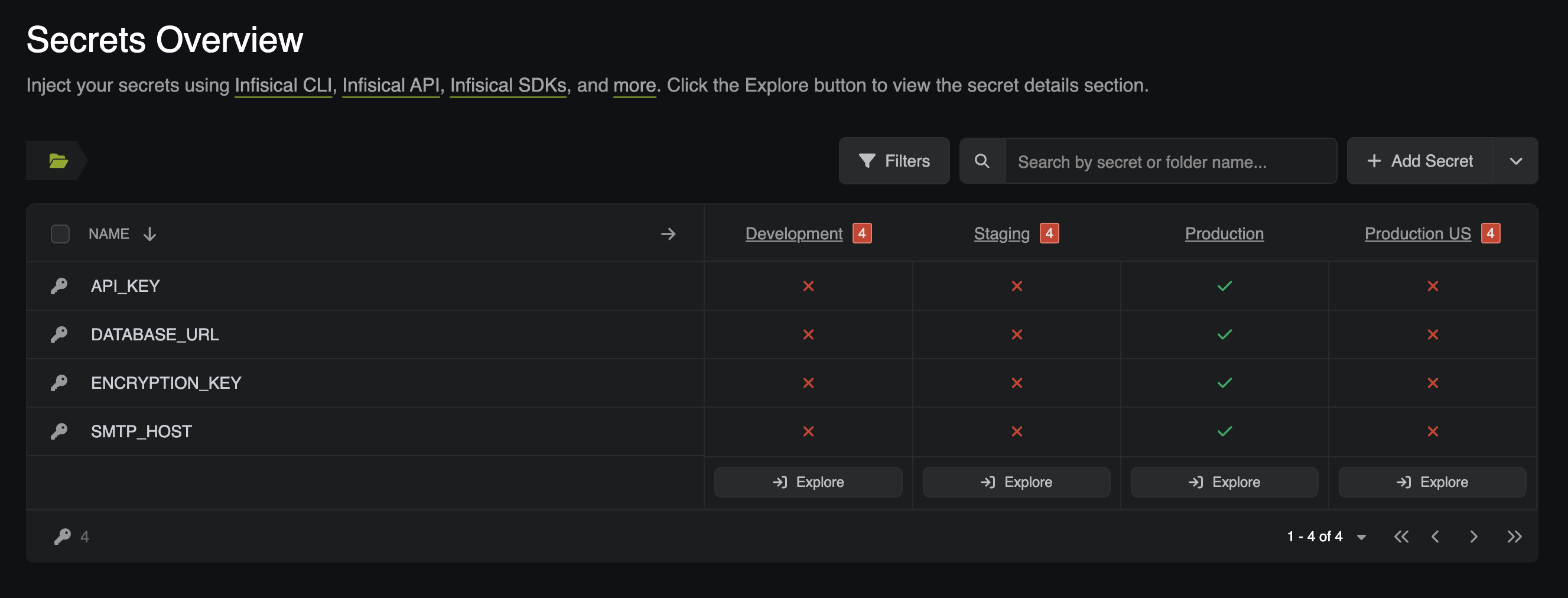
Open your project in Infisical, select the environment you pushed to, and confirm `API_KEY` now appears. The operator pushes when you apply the resource and again whenever it changes; it does not re-sync on a timer unless you set `spec.resyncInterval` (for example `1m`). If `API_KEY` is missing, check the resource's status conditions and the operator logs as described in [Troubleshooting](#troubleshooting).
 ## Generate a dynamic secret with the InfisicalDynamicSecret CRD
The [`InfisicalDynamicSecret`](/docs/integrations/platforms/kubernetes/infisical-dynamic-secret-crd) CRD tells the operator to create and lease a [Dynamic Secret](/docs/documentation/platform/dynamic-secrets/overview), then write the lease credentials into a Kubernetes Secret that any workload can consume. Like the push CRD, it is a `v1alpha1` resource with its own inline `authentication` block; the shared connection and auth objects are not used here.
1. In your project, open the dropdown next to **Add Secret** and select **Add Dynamic Secret**.
2. Select **SQL Database**, then [**PostgreSQL**](/docs/documentation/platform/dynamic-secrets/postgresql) as the provider.
3. Enter your database's **Host**, **Port**, **User**, **Password**, and **Database Name**. The database must be network-reachable from your Infisical instance, as noted in the prerequisites.
4. In the CA (SSL) section, upload your database's CA certificate if it enforces TLS with a custom CA. If it does not require a custom CA, leave this empty.
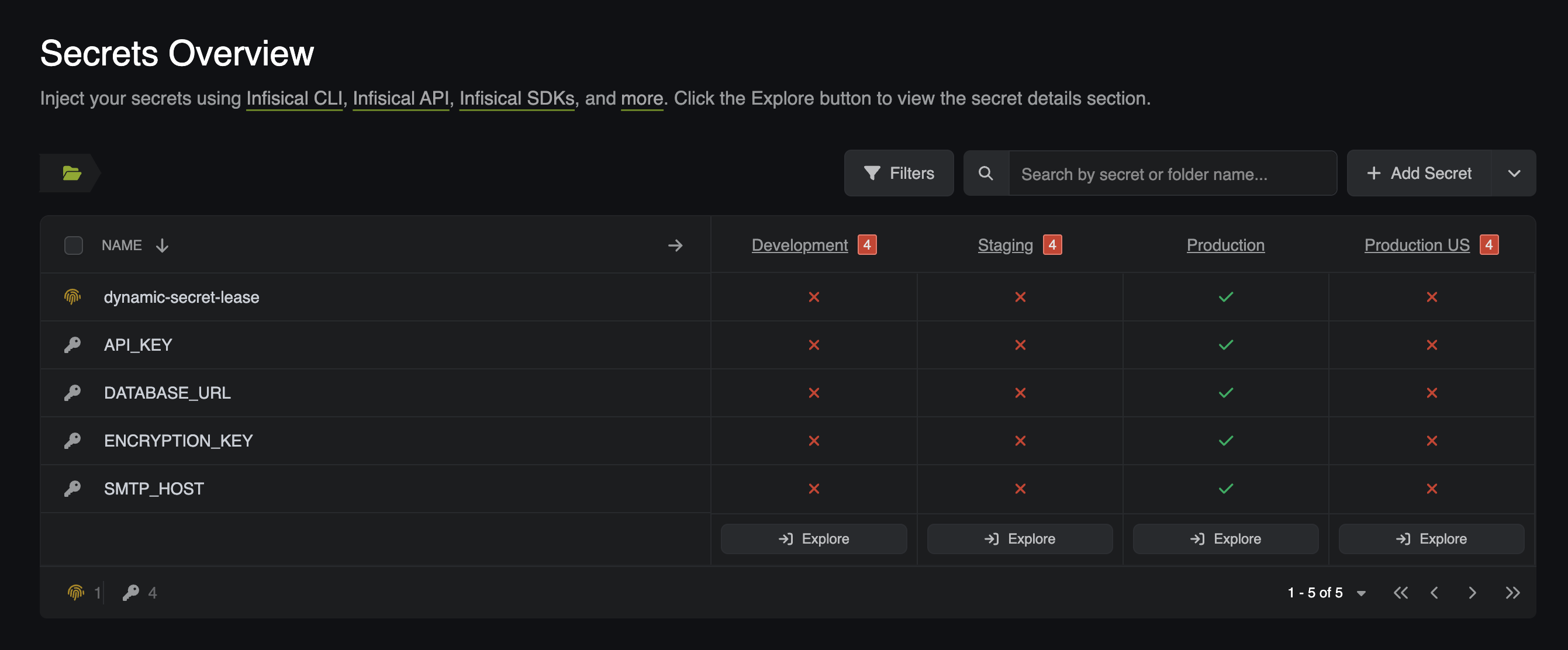
5. Set the **Secret Name** to `dynamic-secret-lease`.
6. Select the environment matching the slug you confirmed earlier.
## Generate a dynamic secret with the InfisicalDynamicSecret CRD
The [`InfisicalDynamicSecret`](/docs/integrations/platforms/kubernetes/infisical-dynamic-secret-crd) CRD tells the operator to create and lease a [Dynamic Secret](/docs/documentation/platform/dynamic-secrets/overview), then write the lease credentials into a Kubernetes Secret that any workload can consume. Like the push CRD, it is a `v1alpha1` resource with its own inline `authentication` block; the shared connection and auth objects are not used here.
1. In your project, open the dropdown next to **Add Secret** and select **Add Dynamic Secret**.
2. Select **SQL Database**, then [**PostgreSQL**](/docs/documentation/platform/dynamic-secrets/postgresql) as the provider.
3. Enter your database's **Host**, **Port**, **User**, **Password**, and **Database Name**. The database must be network-reachable from your Infisical instance, as noted in the prerequisites.
4. In the CA (SSL) section, upload your database's CA certificate if it enforces TLS with a custom CA. If it does not require a custom CA, leave this empty.
5. Set the **Secret Name** to `dynamic-secret-lease`.
6. Select the environment matching the slug you confirmed earlier.
 Three names are in play. Keep them straight:
| Name | Where it lives | Value in this tutorial |
| --------------------------------------- | ------------------------------------------ | ---------------------- |
| Infisical dynamic secret name | Set in the Infisical UI above | `dynamic-secret-lease` |
| CRD `dynamicSecret.secretName` | Must equal the Infisical name | `dynamic-secret-lease` |
| CRD `managedSecretReference.secretName` | The Kubernetes Secret the operator creates | `dynamic-secret-test` |
The verify command reads the Kubernetes Secret, so it uses `managedSecretReference.secretName`.
Save the manifest below as `dynamic-secret.yaml`. Replace `your-identity-id` and `your-project-slug`, and set `environmentSlug` to your confirmed slug.
```yaml theme={"dark"}
apiVersion: secrets.infisical.com/v1alpha1
kind: InfisicalDynamicSecret
metadata:
name: dynamic-secret-demo
namespace: default
spec:
dynamicSecret:
secretName: dynamic-secret-lease
projectSlug: your-project-slug
environmentSlug: prod
secretsPath: "/"
authentication:
kubernetesAuth:
identityId: your-identity-id
serviceAccountRef:
name: infisical-service-account
namespace: default
managedSecretReference:
secretName: dynamic-secret-test
secretNamespace: default
leaseRevocationPolicy: Revoke
leaseTTL: "1h"
```
Note for this CRD:
* The authentication block is the same inline shape as the push CRD, and the environment field is `environmentSlug`. Here `projectSlug`/`environmentSlug`/`secretsPath` live under `spec.dynamicSecret`.
* `leaseRevocationPolicy: Revoke` revokes the lease when you delete the resource, which matters for cleanup. Omit it to leave leases in place.
* `leaseTTL` is optional. When omitted, the operator sends no TTL and the lease uses the dynamic secret's own default TTL configured in Infisical.
* Like the push CRD, it accepts `spec.hostAPI` for self-hosted instances.
Apply the resource:
```bash theme={"dark"}
kubectl apply -f dynamic-secret.yaml
```
Confirm the operator created the Kubernetes Secret holding the lease credentials. If it is not there yet, wait a few seconds for the first reconcile and run the command again:
```bash theme={"dark"}
kubectl get secret dynamic-secret-test -n default -o yaml
```
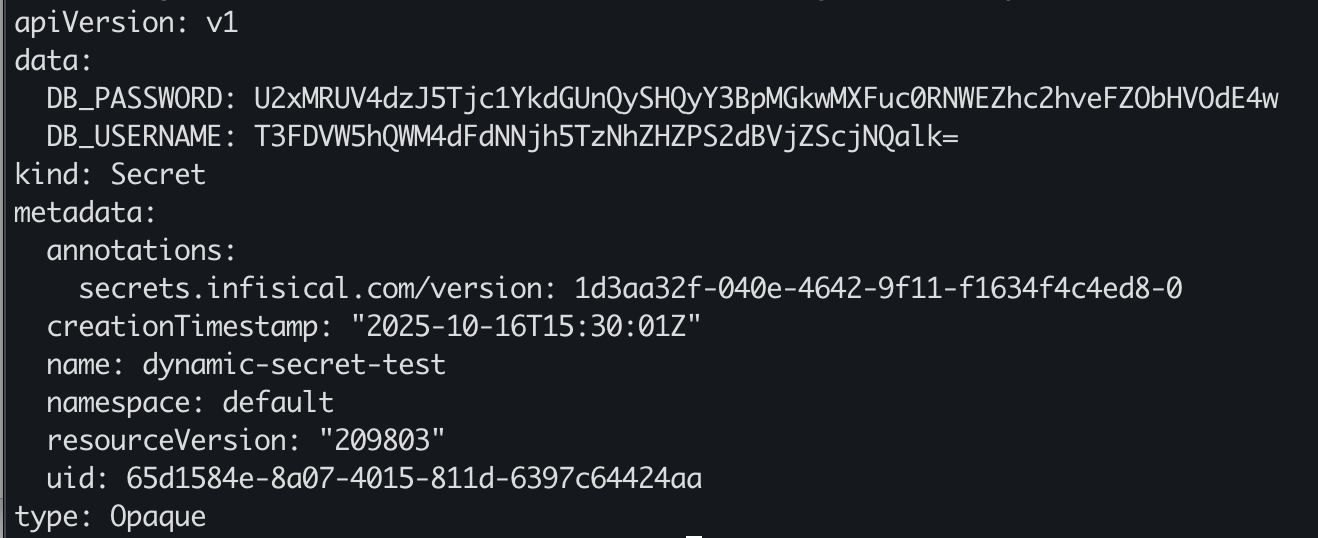
The `data` section should contain the generated database username and password for the lease. If you renamed `managedSecretReference.secretName`, substitute that name in the command above.
Three names are in play. Keep them straight:
| Name | Where it lives | Value in this tutorial |
| --------------------------------------- | ------------------------------------------ | ---------------------- |
| Infisical dynamic secret name | Set in the Infisical UI above | `dynamic-secret-lease` |
| CRD `dynamicSecret.secretName` | Must equal the Infisical name | `dynamic-secret-lease` |
| CRD `managedSecretReference.secretName` | The Kubernetes Secret the operator creates | `dynamic-secret-test` |
The verify command reads the Kubernetes Secret, so it uses `managedSecretReference.secretName`.
Save the manifest below as `dynamic-secret.yaml`. Replace `your-identity-id` and `your-project-slug`, and set `environmentSlug` to your confirmed slug.
```yaml theme={"dark"}
apiVersion: secrets.infisical.com/v1alpha1
kind: InfisicalDynamicSecret
metadata:
name: dynamic-secret-demo
namespace: default
spec:
dynamicSecret:
secretName: dynamic-secret-lease
projectSlug: your-project-slug
environmentSlug: prod
secretsPath: "/"
authentication:
kubernetesAuth:
identityId: your-identity-id
serviceAccountRef:
name: infisical-service-account
namespace: default
managedSecretReference:
secretName: dynamic-secret-test
secretNamespace: default
leaseRevocationPolicy: Revoke
leaseTTL: "1h"
```
Note for this CRD:
* The authentication block is the same inline shape as the push CRD, and the environment field is `environmentSlug`. Here `projectSlug`/`environmentSlug`/`secretsPath` live under `spec.dynamicSecret`.
* `leaseRevocationPolicy: Revoke` revokes the lease when you delete the resource, which matters for cleanup. Omit it to leave leases in place.
* `leaseTTL` is optional. When omitted, the operator sends no TTL and the lease uses the dynamic secret's own default TTL configured in Infisical.
* Like the push CRD, it accepts `spec.hostAPI` for self-hosted instances.
Apply the resource:
```bash theme={"dark"}
kubectl apply -f dynamic-secret.yaml
```
Confirm the operator created the Kubernetes Secret holding the lease credentials. If it is not there yet, wait a few seconds for the first reconcile and run the command again:
```bash theme={"dark"}
kubectl get secret dynamic-secret-test -n default -o yaml
```
The `data` section should contain the generated database username and password for the lease. If you renamed `managedSecretReference.secretName`, substitute that name in the command above.
 ## Verify the result
Confirm the shared objects are healthy and all three workflows succeeded:
* **Connection**: `kubectl get infisicalconnection infisical-connection -n default` shows `True` in the `READY` column.
* **Auth**: `kubectl get infisicalauth infisical-auth -n default` shows `True` in the `READY` column.
* **Pull**: `kubectl exec -it $(kubectl get pod -l app=nginx -n default -o jsonpath='{.items[0].metadata.name}') -n default -- env | grep SMTP` prints `SMTP_HOST=smtp@gmail.com`.
* **Push**: `API_KEY` appears in your Infisical project's environment.
* **Dynamic**: `kubectl get secret dynamic-secret-test -n default -o jsonpath='{.data}' | jq` shows lease credentials.
If all five checks pass, you have synced secrets in both directions and generated a leased database credential from Kubernetes.
## Troubleshooting
If a sync does not produce the expected result, inspect the resources' status conditions and the operator logs before changing anything. For the pull path, diagnose in dependency order: connection first, then auth, then the static secret. Each resource only becomes ready after the one it references.
Describe the resource and read its conditions:
```bash theme={"dark"}
kubectl describe infisicalconnection infisical-connection -n default
```
The operator sets `secrets.infisical.com/IsReady` from a health check: it calls `/api/status` and expects a successful response. If `IsReady` is `False`, the condition message names the error. Common causes:
* The address is wrong, or the Infisical instance is not reachable from inside the cluster (this direction is the operator calling Infisical).
* `spec.address` is empty and the operator's `INFISICAL_HOST_API` environment variable is not set. The error message says exactly this.
* A self-hosted instance uses a custom CA the operator does not trust. Reference the CA via `spec.tls.caCertificate`.
Healthy connections are re-checked every 5 minutes, so a recovered instance can take a few minutes to show `Ready` again.
Describe the resource and read its conditions:
```bash theme={"dark"}
kubectl describe infisicalauth infisical-auth -n default
```
The operator sets `secrets.infisical.com/IsReady` (the login result) and `secrets.infisical.com/AuthMethod` (the method in use). If `IsReady` is `False`, check these causes in order:
* The referenced `InfisicalConnection` is not ready. The auth cannot log in until the connection's `IsReady` condition is `True`; fix the connection first.
* `identityIdRef` points at a missing Secret or key, or the stored Identity ID is wrong. Confirm with `kubectl get secret kubernetes-credentials -n default -o jsonpath='{.data.identityId}' | base64 -d`.
* The Kubernetes Auth method is not fully wired: the **Token Reviewer JWT** was never pasted, or the service-account name or namespace does not match the **Allowed Service Account Names** / **Allowed Namespaces** you configured.
* **The cluster's API server is not reachable from the Infisical instance.** Kubernetes Auth requires the Infisical backend to call your cluster's TokenReview API at the **Kubernetes Host URL**. If you pasted a local address such as `https://127.0.0.1:6443` while using Infisical Cloud, every login fails even though the JWT and names are correct. Revisit the prerequisites.
Describe the resource and read its conditions:
```bash theme={"dark"}
kubectl describe infisicalstaticsecret infisical-static-secret-demo -n default
```
The operator sets `secrets.infisical.com/LastReconcileStatus`: `True` with reason `OK` on success, or `False` with a "Reconciliation failed" message naming the error. Common causes:
* The referenced `InfisicalAuth` is not ready. The static secret cannot sync until the auth's `IsReady` condition is `True`; work up the chain.
* A wrong `projectSlug`, `environmentSlug`, or `secretPath` in `sources`, or the Machine Identity lacks access to the project.
* A source sets both or neither of `projectId`/`projectSlug`; exactly one is required.
Then check the operator logs:
```bash theme={"dark"}
kubectl logs -l control-plane=controller-manager -n default
```
Describe the push resource:
```bash theme={"dark"}
kubectl describe infisicalpushsecret push-secret-demo -n default
```
Check the `secrets.infisical.com/Authenticated` and `secrets.infisical.com/Reconcile` conditions. Read the `Reconcile` condition's Reason and Message rather than its `True`/`False` status: on failure this condition reports `Status=True` with `Reason=Error`, the opposite of the usual Kubernetes convention, and the message names the error. Confirm `push.secret.secretName` matches an existing Kubernetes Secret and that `destination.projectSlug` and `destination.environmentSlug` are correct. If you self-host, confirm `spec.hostAPI` (or the Helm `hostAPI` value) points at your instance; otherwise the operator targets `https://app.infisical.com/api`.
Describe the dynamic-secret resource:
```bash theme={"dark"}
kubectl describe infisicaldynamicsecret dynamic-secret-demo -n default
```
The operator sets `secrets.infisical.com/Authenticated`, `secrets.infisical.com/LeaseCreated`, and `secrets.infisical.com/LeaseRenewal`. A failed `LeaseCreated` carries whatever error lease creation returned, commonly an unreachable database or wrong connection credentials. Confirm the database is reachable from your Infisical instance and that the connection details entered in the UI are correct.
## Clean up
Remove the resources this tutorial created so you do not leave an active database lease or orphaned objects behind. Delete consumers before the objects they reference, so nothing reconciles against a missing dependency.
1. Delete the sync resources. Deleting the `InfisicalDynamicSecret` with `leaseRevocationPolicy: Revoke` revokes the active database lease.
Because the push CRD was created with `deletionPolicy: Delete`, deleting it also removes the pushed `API_KEY` secret from your Infisical project. If you pushed into a shared environment, make sure that is what you want.
```bash theme={"dark"}
kubectl delete infisicaldynamicsecret dynamic-secret-demo -n default
kubectl delete infisicalpushsecret push-secret-demo -n default
kubectl delete infisicalstaticsecret infisical-static-secret-demo -n default
```
Because the static secret's target used `creationPolicy: Owner`, the managed `managed-secret` is deleted along with the CRD.
2. Delete the auth object, then the connection it references:
```bash theme={"dark"}
kubectl delete infisicalauth infisical-auth -n default
kubectl delete infisicalconnection infisical-connection -n default
```
3. Delete the demo app and the remaining secrets, including the Identity ID Secret:
```bash theme={"dark"}
kubectl delete deployment nginx-demo -n default
kubectl delete secret dynamic-secret-test push-secret-demo kubernetes-credentials -n default
```
4. Delete the service accounts, their token secrets, and the ClusterRoleBinding:
```bash theme={"dark"}
kubectl delete secret infisical-token-reviewer-token infisical-service-account-token -n default
kubectl delete serviceaccount infisical-token-reviewer infisical-service-account -n default
kubectl delete clusterrolebinding infisical-token-reviewer-binding
```
5. Uninstall the operator:
```bash theme={"dark"}
helm uninstall infisical-operator
```
6. In Infisical, delete the dynamic secret, the demo Machine Identity, and the demo Project if you no longer need them.
## Next steps
* [InfisicalConnection CRD reference](/docs/integrations/platforms/kubernetes/infisical-connection-crd)
* [InfisicalAuth CRD reference](/docs/integrations/platforms/kubernetes/infisical-auth-crd)
* [InfisicalStaticSecret CRD reference](/docs/integrations/platforms/kubernetes/infisical-static-secret-crd)
* [InfisicalPushSecret CRD reference](/docs/integrations/platforms/kubernetes/infisical-push-secret-crd)
* [InfisicalDynamicSecret CRD reference](/docs/integrations/platforms/kubernetes/infisical-dynamic-secret-crd)
* [InfisicalSecret CRD reference (v1alpha1 pull)](/docs/integrations/platforms/kubernetes/infisical-secret-crd)
* [Kubernetes Auth for Machine Identities](/docs/documentation/platform/identities/kubernetes-auth)
## Verify the result
Confirm the shared objects are healthy and all three workflows succeeded:
* **Connection**: `kubectl get infisicalconnection infisical-connection -n default` shows `True` in the `READY` column.
* **Auth**: `kubectl get infisicalauth infisical-auth -n default` shows `True` in the `READY` column.
* **Pull**: `kubectl exec -it $(kubectl get pod -l app=nginx -n default -o jsonpath='{.items[0].metadata.name}') -n default -- env | grep SMTP` prints `SMTP_HOST=smtp@gmail.com`.
* **Push**: `API_KEY` appears in your Infisical project's environment.
* **Dynamic**: `kubectl get secret dynamic-secret-test -n default -o jsonpath='{.data}' | jq` shows lease credentials.
If all five checks pass, you have synced secrets in both directions and generated a leased database credential from Kubernetes.
## Troubleshooting
If a sync does not produce the expected result, inspect the resources' status conditions and the operator logs before changing anything. For the pull path, diagnose in dependency order: connection first, then auth, then the static secret. Each resource only becomes ready after the one it references.
Describe the resource and read its conditions:
```bash theme={"dark"}
kubectl describe infisicalconnection infisical-connection -n default
```
The operator sets `secrets.infisical.com/IsReady` from a health check: it calls `/api/status` and expects a successful response. If `IsReady` is `False`, the condition message names the error. Common causes:
* The address is wrong, or the Infisical instance is not reachable from inside the cluster (this direction is the operator calling Infisical).
* `spec.address` is empty and the operator's `INFISICAL_HOST_API` environment variable is not set. The error message says exactly this.
* A self-hosted instance uses a custom CA the operator does not trust. Reference the CA via `spec.tls.caCertificate`.
Healthy connections are re-checked every 5 minutes, so a recovered instance can take a few minutes to show `Ready` again.
Describe the resource and read its conditions:
```bash theme={"dark"}
kubectl describe infisicalauth infisical-auth -n default
```
The operator sets `secrets.infisical.com/IsReady` (the login result) and `secrets.infisical.com/AuthMethod` (the method in use). If `IsReady` is `False`, check these causes in order:
* The referenced `InfisicalConnection` is not ready. The auth cannot log in until the connection's `IsReady` condition is `True`; fix the connection first.
* `identityIdRef` points at a missing Secret or key, or the stored Identity ID is wrong. Confirm with `kubectl get secret kubernetes-credentials -n default -o jsonpath='{.data.identityId}' | base64 -d`.
* The Kubernetes Auth method is not fully wired: the **Token Reviewer JWT** was never pasted, or the service-account name or namespace does not match the **Allowed Service Account Names** / **Allowed Namespaces** you configured.
* **The cluster's API server is not reachable from the Infisical instance.** Kubernetes Auth requires the Infisical backend to call your cluster's TokenReview API at the **Kubernetes Host URL**. If you pasted a local address such as `https://127.0.0.1:6443` while using Infisical Cloud, every login fails even though the JWT and names are correct. Revisit the prerequisites.
Describe the resource and read its conditions:
```bash theme={"dark"}
kubectl describe infisicalstaticsecret infisical-static-secret-demo -n default
```
The operator sets `secrets.infisical.com/LastReconcileStatus`: `True` with reason `OK` on success, or `False` with a "Reconciliation failed" message naming the error. Common causes:
* The referenced `InfisicalAuth` is not ready. The static secret cannot sync until the auth's `IsReady` condition is `True`; work up the chain.
* A wrong `projectSlug`, `environmentSlug`, or `secretPath` in `sources`, or the Machine Identity lacks access to the project.
* A source sets both or neither of `projectId`/`projectSlug`; exactly one is required.
Then check the operator logs:
```bash theme={"dark"}
kubectl logs -l control-plane=controller-manager -n default
```
Describe the push resource:
```bash theme={"dark"}
kubectl describe infisicalpushsecret push-secret-demo -n default
```
Check the `secrets.infisical.com/Authenticated` and `secrets.infisical.com/Reconcile` conditions. Read the `Reconcile` condition's Reason and Message rather than its `True`/`False` status: on failure this condition reports `Status=True` with `Reason=Error`, the opposite of the usual Kubernetes convention, and the message names the error. Confirm `push.secret.secretName` matches an existing Kubernetes Secret and that `destination.projectSlug` and `destination.environmentSlug` are correct. If you self-host, confirm `spec.hostAPI` (or the Helm `hostAPI` value) points at your instance; otherwise the operator targets `https://app.infisical.com/api`.
Describe the dynamic-secret resource:
```bash theme={"dark"}
kubectl describe infisicaldynamicsecret dynamic-secret-demo -n default
```
The operator sets `secrets.infisical.com/Authenticated`, `secrets.infisical.com/LeaseCreated`, and `secrets.infisical.com/LeaseRenewal`. A failed `LeaseCreated` carries whatever error lease creation returned, commonly an unreachable database or wrong connection credentials. Confirm the database is reachable from your Infisical instance and that the connection details entered in the UI are correct.
## Clean up
Remove the resources this tutorial created so you do not leave an active database lease or orphaned objects behind. Delete consumers before the objects they reference, so nothing reconciles against a missing dependency.
1. Delete the sync resources. Deleting the `InfisicalDynamicSecret` with `leaseRevocationPolicy: Revoke` revokes the active database lease.
Because the push CRD was created with `deletionPolicy: Delete`, deleting it also removes the pushed `API_KEY` secret from your Infisical project. If you pushed into a shared environment, make sure that is what you want.
```bash theme={"dark"}
kubectl delete infisicaldynamicsecret dynamic-secret-demo -n default
kubectl delete infisicalpushsecret push-secret-demo -n default
kubectl delete infisicalstaticsecret infisical-static-secret-demo -n default
```
Because the static secret's target used `creationPolicy: Owner`, the managed `managed-secret` is deleted along with the CRD.
2. Delete the auth object, then the connection it references:
```bash theme={"dark"}
kubectl delete infisicalauth infisical-auth -n default
kubectl delete infisicalconnection infisical-connection -n default
```
3. Delete the demo app and the remaining secrets, including the Identity ID Secret:
```bash theme={"dark"}
kubectl delete deployment nginx-demo -n default
kubectl delete secret dynamic-secret-test push-secret-demo kubernetes-credentials -n default
```
4. Delete the service accounts, their token secrets, and the ClusterRoleBinding:
```bash theme={"dark"}
kubectl delete secret infisical-token-reviewer-token infisical-service-account-token -n default
kubectl delete serviceaccount infisical-token-reviewer infisical-service-account -n default
kubectl delete clusterrolebinding infisical-token-reviewer-binding
```
5. Uninstall the operator:
```bash theme={"dark"}
helm uninstall infisical-operator
```
6. In Infisical, delete the dynamic secret, the demo Machine Identity, and the demo Project if you no longer need them.
## Next steps
* [InfisicalConnection CRD reference](/docs/integrations/platforms/kubernetes/infisical-connection-crd)
* [InfisicalAuth CRD reference](/docs/integrations/platforms/kubernetes/infisical-auth-crd)
* [InfisicalStaticSecret CRD reference](/docs/integrations/platforms/kubernetes/infisical-static-secret-crd)
* [InfisicalPushSecret CRD reference](/docs/integrations/platforms/kubernetes/infisical-push-secret-crd)
* [InfisicalDynamicSecret CRD reference](/docs/integrations/platforms/kubernetes/infisical-dynamic-secret-crd)
* [InfisicalSecret CRD reference (v1alpha1 pull)](/docs/integrations/platforms/kubernetes/infisical-secret-crd)
* [Kubernetes Auth for Machine Identities](/docs/documentation/platform/identities/kubernetes-auth)